

Quick answer: A website launch checklist bot should load a package-specific go-live checklist, track QA evidence (speed, forms, redirects, analytics, Search Console), block DNS/cutover until required items pass, draft a go/no-go summary for a human, and only then queue post-launch monitors. Never invent “all green,” never flip production DNS automatically without approval, and never skip redirect coverage on migrations. Build it as Checklist → Evidence → Validate → Human Go/No-Go → Cutover tasks → Monitor — tools + rules + LLM assist.
This is Part 9 of Build Real AI Automations. Parts 1–8 covered lead qualification, support triage, Shopify order status, content ops, appointment booking, discovery → proposal, client onboarding, and post-project review + case-study intake. Launch sits between build and proof: this is where rankings die if redirects and QA are hand-waved.
At Let Start Design we treat go-live as a controlled procedure — especially on redesigns and platform moves. See also changing platforms without losing rankings. Below is the architecture, guardrails, build steps, MVP plan, and how we outperform freelancers and chatbot shops when launch risk is real.
What the launch checklist bot should (and should not) do
It should:
- Load a checklist keyed to package type (marketing site, WordPress, Shopify, redesign/migration)
- Track required evidence: Lighthouse/CWV notes, form tests, 301 map coverage, robots/sitemap, analytics, GSC property
- Diff staging vs production URL lists for migrations
- Draft a go/no-go brief with open blockers
- Queue cutover tasks (DNS, SSL, redirects, Search Console sitemap submit) for humans
- Schedule post-launch checks (404 spike, redirect loops, form failures)
- Update CRM stage to Launched only after approval
- Stop for human Go / Hold / Escalate before any production cutover action
It should not:
- Mark items complete because someone typed “done” in Slack
- Auto-change DNS or delete the old site
- Invent redirect mappings for URLs it never crawled
- Declare Core Web Vitals “fine” without a recorded run
- Skip noindex removal checks on staging cloning mistakes
Shape: copilot with tools, not an unbounded “launch agent.”
Architecture
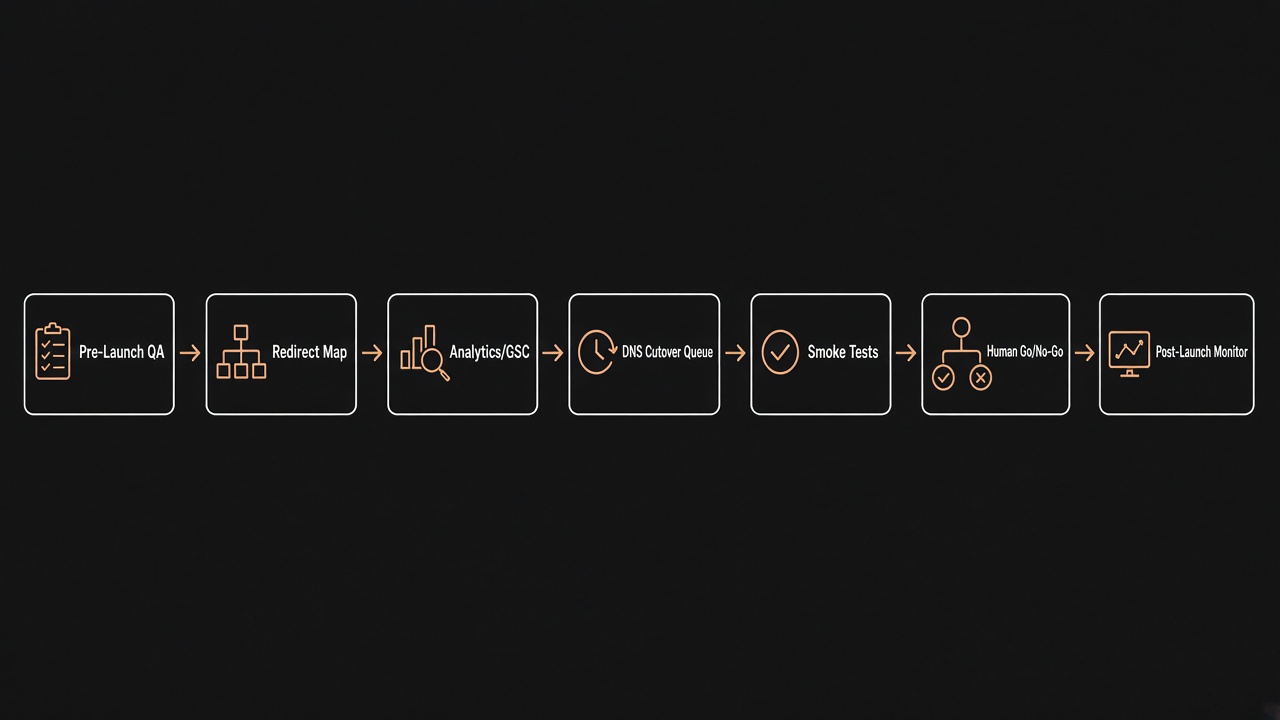
- Trigger — staging “ready for QA” or scheduled launch date approaching.
- Checklist loader — package ID from Parts 6–7 selects items.
- Evidence collectors — uploads, URLs, crawler outputs, manual test checkboxes with owner + timestamp.
- Validators — required coverage %, critical blockers, noindex/robots sanity.
- Go/no-go drafter — LLM summarizes status into a PM brief (no fake greens).
- Human gate + cutover queue — approved tasks assigned; post-launch monitors armed.
Guardrails checklist (non-negotiable)
- Package-specific lists — migrations require redirect + ranking protection items.
- Evidence required — blocking items need artifact or signed test log, not vibes.
- Redirect coverage threshold — e.g. ≥95% of crawled legacy URLs mapped or explicitly deprecated.
- Robots/noindex gate — production must not ship staging noindex.
- Forms & checkout smoke — contact, newsletter, cart paths tested on production hostname after cutover.
- Analytics dual-run window — old + new tags plan documented when replacing properties.
- DNS/cutover lock — API rejects cutover task complete without
go_approved_by. - Rollback note — every launch run stores how to revert DNS/hosting.
- Idempotent launch key — one launch run per deal/environment.
Step-by-step build guide
Step 1 — Define checklist templates
Example required groups:
- Content & IA freeze
- Performance (LCP/INP notes on key templates)
- SEO (titles, canonicals, sitemap, robots, schema spot-check)
- Redirects (map file + sample 301 tests)
- Tracking (GA4/GTM/Ads/pixels with consent mode if used)
- Forms & critical journeys
- Access & backups
- Legal (privacy/terms links live)
- Post-launch monitor plan
Align packages with the Project Builder so sold scope matches launch depth.
Step 2 — Attach crawlers and maps for migrations
Import a crawl of the legacy site (Screaming Frog export or similar). Matcher suggests 301 targets; humans confirm. Unmapped URLs become explicit gone, redirect_later, or blocker — the model does not invent destinations.
Step 3 — Evidence model
- Each item: status, owner, evidence URL/file, notes, completed_at
- LLM may rewrite notes for the go/no-go brief
- Status
completeonly when validator rules pass
Step 4 — Draft go/no-go
Output: Ready / Ready with watchouts / Not ready. List blockers with owners. Ban phrases like “SEO will be fine” without redirect coverage stats.
Step 5 — Human Go / Hold / Escalate
- Go — unlocks cutover task list
- Hold — keeps staging; assigns blockers
- Escalate — ranking-sensitive migration, client DNS delay, legal hold
Step 6 — Cutover queue (human-executed)
- DNS / hosting switch
- SSL verify
- Redirects live
- Remove staging auth / noindex
- Submit sitemap in Search Console
- Smoke test forms on production URL
Step 7 — Post-launch monitors → Part 8
24–72h checks: 404 rate, redirect loops, form errors. When stable, hand off to Part 8 proof intake.
Pseudo-flow (tool calling)
get_deal(deal_id)— package, domains, migration flagload_launch_checklist(package_id)create_launch_run(deal_id, env)import_url_crawl(file) → Url[]upsert_redirect_map(rows)attach_evidence(item_id, artifact)validate_launch(run_id) → Reportdraft_go_nogo(run_id) → Briefrequest_pm_decision(run_id)unlock_cutover_tasks(run_id)— if Goschedule_monitors(run_id, window)update_crm(deal_id, stage)
No tool should mutate live DNS. Cutover tasks are checklists for qualified humans (or separate infra runbooks with their own approvals).
2-week MVP plan
- Days 1–2 — Checklist JSON for redesign + new marketing site packages
- Days 3–4 — Evidence UI + required/optional logic
- Days 5–6 — Redirect map import + coverage % validator
- Days 7–8 — Go/no-go draft + Approve UI
- Days 9–10 — Cutover task list + rollback notes field
- Days 11–12 — Post-launch monitor reminders
- Days 13–14 — Shadow on one real staging launch
Quality metrics
- % launches with Go decision recorded before DNS change
- Redirect coverage % on migrations
- Critical defects found pre- vs post-launch
- False-ready incidents (launched with open blockers) — target zero
- Time from staging-ready → Go
- 404 spike in first 72h vs baseline
Common failures
- Checkbox theater — everything ticked, nothing tested
- No redirect map — “Google will figure it out”
- Staging noindex left on — invisible production site
- Auto-DNS fantasy — bot “launches” without human change control
- Analytics gap — tags missing on thank-you pages
- Skipping Part 7 continuity — wrong domain/access still open at cutover
Freelancer vs chatbot agency vs specialist studio
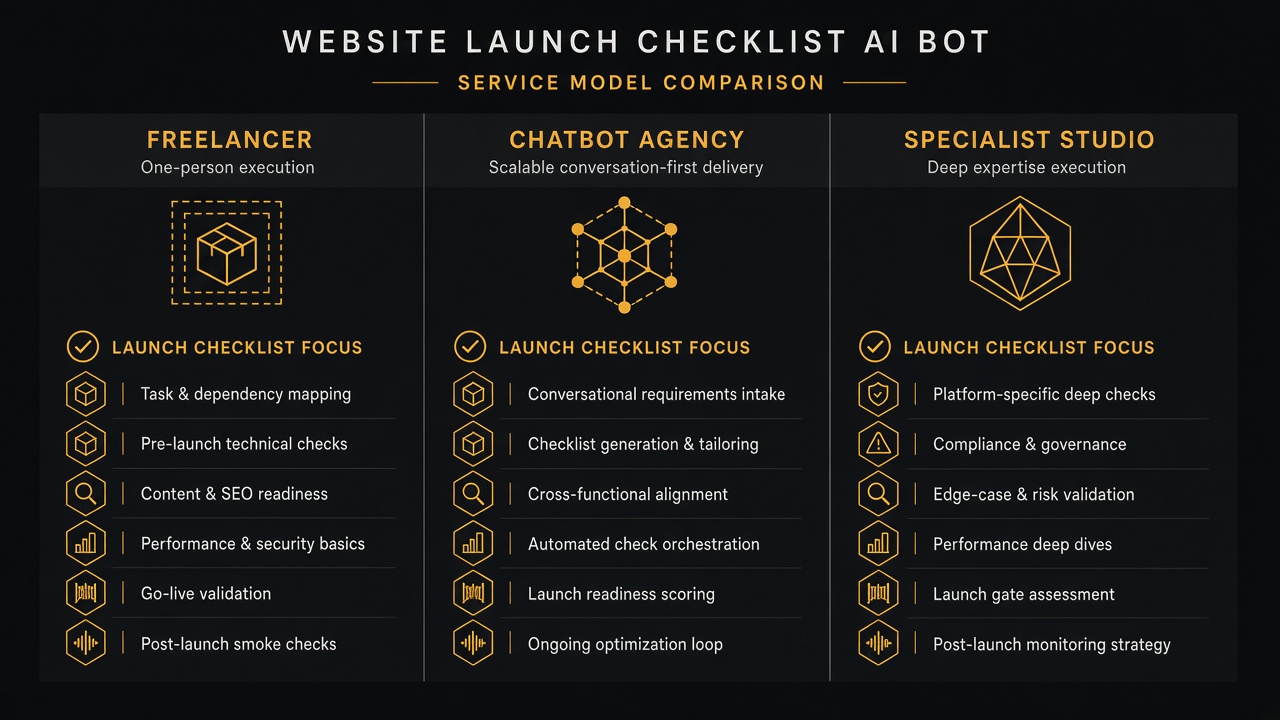
| Solo freelancer | Typical chatbot agency | Let Start Design | |
|---|---|---|---|
| QA depth | Ad-hoc memory | Generic tips chatbot | Package checklists + evidence artifacts |
| Redirects / SEO | Often skipped | Not implemented | Crawl import, coverage gates, GSC steps |
| Go/no-go | Informal Slack | Missing | Documented decision + cutover lock |
| Site + launch system | Split vendors | Widget bolted on | Build + launch ops under one team |
| Big-project capacity | Single point of failure | Juniors on “AI SEO” | Structured QA, migration discipline, support |
| Commercial clarity | Hourly surprises | Opaque retainers | Scope via Project Builder + fixed proposals |
| Best for | Tiny brochure flips | Motivation quotes | Ranking-sensitive launches and redesigns |
How Let Start Design stands out
1) Agents with product discipline
Launch runs get schemas, validators, and human gates — same bar as the rest of this series. See AI website agency expectations in 2026.
2) SEO-safe by default on redesigns
Redirect coverage and ranking protection are first-class checklist items — not a blog tip after traffic drops. Pair with our website redesign and SEO delivery.
3) Guardrails before cutover
No DNS unlock without Go. No fake green status without evidence.
4) Continuity from onboard → launch → proof
Deal and package IDs flow from Part 7 into launch, then into Part 8.
5) White-label capacity
Partners can offer launch ops under their brand through our white-label program.
6) Portfolio proof
We ship real launches — browse the portfolio — including migrations where redirects actually mattered.
Key takeaways
- Evidence and coverage thresholds beat checkbox theater.
- Humans own Go/No-Go; bots draft briefs and enforce locks.
- Migrations need crawl → redirect map → coverage gate.
- Post-launch monitors bridge to Part 8 proof collection.
- For bigger projects, hire a studio with integration capacity — Let Start Design combines agent engineering, website conversion, pricing clarity, and partner delivery.
Want launches that protect rankings and sanity? Talk to Let Start Design, explore AI website development, or model scope in the Project Builder.
Series: Part 1 · Part 2 · Part 3 · Part 4 · Part 5 · Part 6 · Part 7 · Part 8 · Part 9 — Launch checklist
Related: Platform change without losing rankings · AI vs traditional builds · Website redesign
Sources: Google redirects guidance; Structured outputs; Tool / function calling.


