

Quick answer: A support triage bot should classify the ticket, retrieve the most relevant FAQ/docs passages (RAG), draft a reply with citations, and stop for human approval before send. Do not auto-send until confidence, policy checks, and agent edits are in place. Build it as Ticket → Classify → Retrieve → Draft → Approve → Send — with escalation when retrieval is weak.
This is Part 2 of our Build Real AI Automations series. Part 1 covered building a lead-qualification bot with WhatsApp + CRM. Here we apply the same discipline to support: automate the draft, not the commitment.
Most “AI support agents” fail because they send answers they are not sure about. Customers get wrong refund rules, invented SKUs, or outdated shipping policies. The safer production pattern — the one agencies can defend — is a draft-only copilots for support with a hard approval gate.
What this bot does (and refuses to do)
It does
- Ingest new tickets from your helpdesk via webhook/API.
- Classify intent (billing, shipping, bug, how-to, cancel, other).
- Retrieve grounded passages from your approved knowledge base.
- Draft a reply in your brand voice with source links or article IDs.
- Attach a confidence score and missing-info checklist for the agent.
- Queue the draft for Approve / Edit / Escalate.
It refuses
- Auto-sending replies on day one.
- Answering from model memory when retrieval returns nothing useful.
- Handling chargebacks, legal threats, medical/financial advice, or abuse without escalation.
- Changing orders, issuing refunds, or resetting passwords without an authenticated tool call + policy check.
If you still need the product-shape framing, see AI agents vs chatbots vs copilots — this build is a copilot for support agents, not a fully autonomous agent.
Architecture
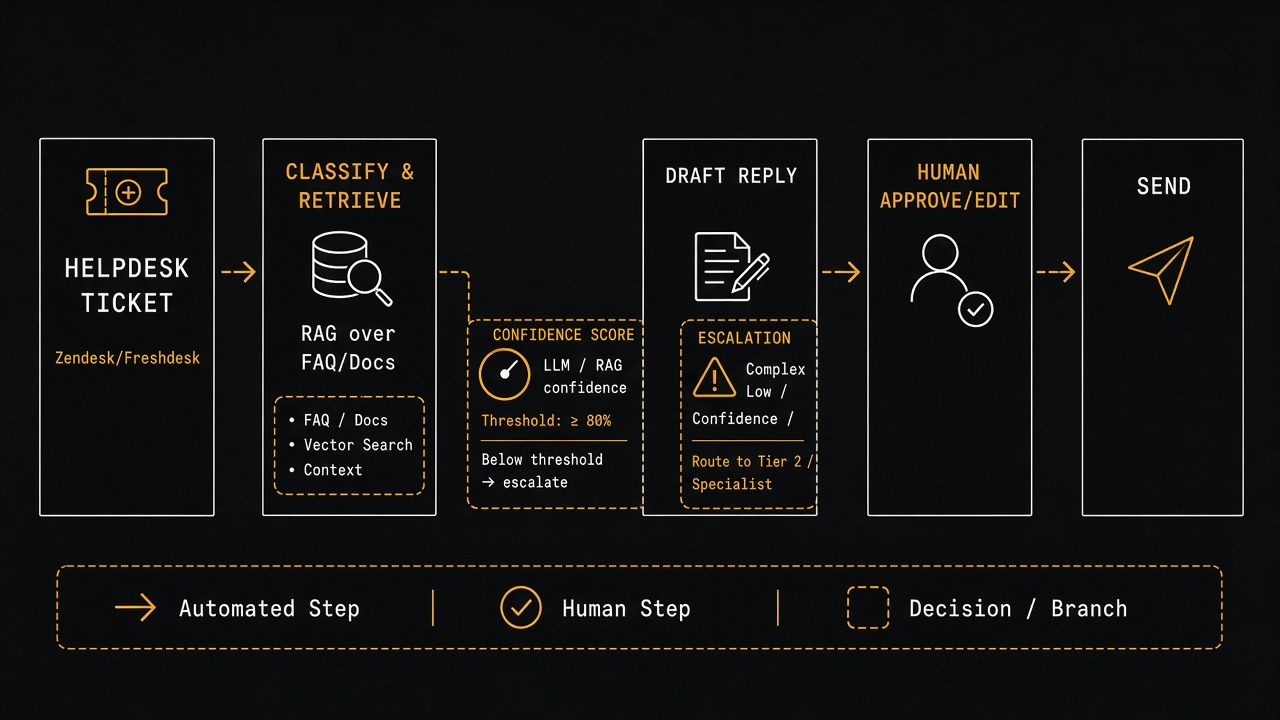
- Helpdesk — Zendesk, Freshdesk, Gorgias, Intercom, or HubSpot Service Hub.
- Ingest webhook — ticket created/updated events.
- Classifier — rules + small model/LLM labeler with a fixed taxonomy.
- Knowledge index — chunked FAQs, SOPs, product docs, policy pages.
- Retriever — embeddings + keyword hybrid search.
- Drafter — LLM constrained to retrieved context only.
- Approval UI — helpdesk private note / sidebar / internal app.
- Sender — helpdesk API reply endpoint, only after approval.
Step 0 — Write the support policy before any prompts
Copy your non-negotiables into a short policy doc the bot must respect:
| Topic | Bot may draft | Must escalate |
|---|---|---|
| Order status | Yes, if order ID verified via tool | Missing auth / mismatched email |
| Refunds | Explain published policy only | Exceptions, goodwill credits |
| Bugs | Collect repro steps + version | Security reports, data loss |
| Account access | Point to reset flow | Manual password changes in chat |
| Legal / threats | No | Always escalate |
Store this as support_policy.md in the knowledge base and inject a compressed version into every draft prompt.
Step 1 — Connect the helpdesk
Use official APIs and webhooks — examples:
- Zendesk Ticketing API + Zendesk webhooks
- Freshdesk API
- Intercom Developer Platform
- Gorgias API (strong for Shopify support teams)
Ingest payload you need
- Ticket ID, subject, description, tags, channel (email/chat/WhatsApp)
- Requester email / name / order ID if present
- Priority and existing macros/tags
- Language if known
On ingest, write a private note: Triage bot queued. Never reply publicly yet.
Step 2 — Build the knowledge base (RAG done properly)
RAG (retrieval-augmented generation) means: retrieve approved text first, then generate only from that text. Google’s own generative features guidance emphasizes grounding in retrieved sources — the same principle applies to support bots. For website-side readiness patterns, see our AI-agent ready guide.
What to index
- Public help center articles
- Internal SOPs (refund windows, warranty, shipping cutoffs)
- Product changelog / known issues
- Macro snippets your best agents already use
- Policy pages (returns, privacy, terms) — versioned
Chunking rules that work
- Split by heading / article section, not arbitrary 500-character slices when possible.
- Keep 200–600 tokens per chunk with slight overlap.
- Store metadata:
article_id,title,url,product,locale,updated_at,sensitivity. - Re-embed when an article changes; do not let stale chunks linger.
Embeddings + search
Use a managed embeddings API or open model, store vectors in pgvector / Pinecone / OpenSearch. Hybrid search (vector + BM25 keyword) usually beats vector-only for SKUs, order IDs, and error codes. OpenAI’s embeddings guide and similar provider docs cover the basics — your retrieval eval matters more than the brand of embedding.
Step 3 — Classify the ticket
Use a fixed taxonomy. Example labels:
order_statusrefund_policyshipping_delayhow_tobug_reportbillingcancel_subscriptionother_escalate
Implementation options:
- Keyword/rules for high-precision intents (refund, cancel, chargeback).
- LLM classifier returning JSON
{label, confidence, entities}. - If confidence < threshold →
other_escalate.
Extract entities early: order ID, SKU, URL, error message, plan name. These drive tool calls later.
Step 4 — Retrieve, then draft (never the reverse)
Retrieval checklist
- Pull top 5–8 chunks.
- Drop chunks older than your policy freshness window for time-sensitive topics (shipping cutoffs, pricing).
- Require at least one chunk above a similarity threshold; otherwise escalate with “insufficient knowledge.”
Draft prompt contract
Force structured output:
draft_reply(customer-facing)citations(article IDs/URLs used)confidence(0–1)missing_info(questions for customer or agent)risk_flags(refund_exception, legal_language, auth_required)recommended_action(approve|edit|escalate)
System rules to hard-code:
- Use only provided context. If missing, say what is unknown.
- No inventing order statuses, prices, or policy exceptions.
- Match brand tone length: short for chat, fuller for email.
- Include next step (what customer should reply with).
Step 5 — Human approval UX (the product)
Put the draft where agents already work:
- Private helpdesk note with Approve / Edit / Escalate buttons (via sidebar app).
- Or an internal queue UI that writes back through the helpdesk API.
Show agents:
- Draft text (editable)
- Citations with one-click article open
- Confidence + risk flags
- Suggested macros/tags
- Timer since ticket arrived (SLA awareness)
One-click Approve calls the helpdesk “create reply” endpoint. Escalate assigns a senior queue and stops drafting loops.
Step 6 — Optional tools (still behind approval)
Only after identity checks:
- Shopify/WooCommerce order lookup by authenticated email + order ID
- Subscription status from billing provider
- Feature flag / status page fetch for incidents
Tool results become extra context for the draft — they still do not auto-send. Destructive tools (refund, cancel) should be separate agent actions with role permissions, not silent bot side effects.
Shopify teams can start from the Shopify Admin API docs; keep scopes least-privilege.
2-week MVP plan
Days 1–2 — Scope
- Pick 3 intents only (e.g. order_status, refund_policy, how_to).
- Export top 50 help articles + 10 macros.
- Write escalation policy table.
Days 3–5 — Index + retrieve
- Chunk, embed, hybrid search.
- Build an offline eval set: 30 real tickets → expected article IDs.
- Measure recall@5 before wiring the LLM.
Days 6–9 — Draft + approval
- Webhook ingest + classifier.
- Drafter with JSON schema validation.
- Private-note approval flow in helpdesk.
- Reply API on Approve only.
Days 10–14 — Pilot
- Enable for one team / one brand / business hours.
- Track edit rate and escalation rate.
- Ban auto-send until edit rate is stably low on those 3 intents.
Evaluation: how you know it is safe
| Metric | What good looks like | Action if bad |
|---|---|---|
| Retrieval recall@5 | > 80% on eval set | Fix chunking/metadata before prompts |
| Agent edit rate | Falling over 2 weeks | Tighten tone + citations |
| Escalation rate | Stable, not 90% | Taxonomy/knowledge gaps |
| Factual error rate (sampled) | Near zero on pilot intents | Block intent from drafting |
| First-response time | Down vs baseline | Queue UX friction |
| CSAT on bot-assisted tickets | Flat or up | Review tone/over-automation |
Sample 20 approved tickets weekly. Score: grounded, correct, complete, on-brand. One invented policy = stop that intent immediately.
Prompt + output example (shape)
Customer ticket: “Hi, can I return sneakers bought 20 days ago? Order #10422.”
Retrieved policy chunk: “Returns accepted within 14 days unused…”
Good draft behavior: explain the 14-day window, ask if unworn/original packaging, offer exchange options if policy allows, cite the returns article, set recommended_action=edit or escalate if the customer requests an exception — never invent a “one-time courtesy refund.”
Guardrails checklist
- No send path without explicit agent approval (feature flag).
- JSON schema validation; on failure → escalate.
- PII scrubbing in logs where required.
- Rate limits per ticket to prevent draft storms on noisy updates.
- Allowlist tools; deny refund/cancel by default.
- Locale matching: do not answer German tickets from English-only chunks without translation policy.
- Incident mode: if status page = major outage, prefer a single approved macro over free generation.
Build vs buy
- Buy: helpdesk-native AI assist (Zendesk/Intercom/Gorgias features) — fastest UI, less control over retrieval eval.
- Assemble: helpdesk webhook + vector DB + LLM + internal approve app — best for agencies productizing the flow across clients.
- Hybrid: vendor draft UI, your knowledge index and policy layer — common in white-label setups.
Whatever you pick, keep evaluation and policy ownership. Vendors should not be the only ones who can explain why a reply was drafted.
Common failures
- Auto-send too early: turn it off; measure edit rate first.
- Whole-site dump as knowledge: index curated SOPs, not random blog posts.
- No citations: agents cannot verify; require article IDs in output.
- One mega-prompt: split classify / retrieve / draft stages for debugging.
- Ignoring macros: your best human replies are gold — index them.
- No ownership: assign a support lead to review weekly error samples.
What Part 3 will cover
Next: Shopify Order Status Bot — From “Where Is My Order?” to Verified Auto-Reply. That build adds authenticated order lookup and shows when a narrow intent can graduate from draft-only to supervised auto-send.
Key takeaways
- Draft-only support bots protect customers and your brand.
- Policy + taxonomy first; prompts second.
- RAG quality (chunking, hybrid retrieval, recall@5) beats clever wording.
- Approve / Edit / Escalate is the product — not the model.
- Graduate to auto-send only per intent, after metrics earn trust.
Need a draft-only triage layer on Zendesk, Freshdesk, Gorgias, or HubSpot — with your SOPs indexed and an approval workflow sales/support will actually use? Talk to Let Start Design. We build the website and the automation around it.
Related: Part 1 — Lead-qualification bot · Agents vs chatbots vs copilots · AI-agent ready websites · Services
Sources: Zendesk Ticketing API; Freshdesk API; Intercom developers; Gorgias API; OpenAI embeddings; Shopify Admin API.


