

Quick answer: A content ops bot turns a structured brief into an outline, draft, internal-link suggestions, and FAQs — then stops for human edit before anything is published. Build it as a staged pipeline (intake → research pack → outline → draft → links/FAQs → edit gate → CMS draft), not as one “write a blog” button that ships unsupervised pages.
This is Part 4 of Build Real AI Automations. Parts 1–3 automated lead qualification, support drafts, and Shopify order status. Here we automate the agency content factory — without handing the publish button to a model.
At Let Start Design we ship a lot of SEO and AI-topic content. The win is not “AI wrote it.” The win is faster first drafts with brand constraints, internal links, and FAQ schema ready — while a human still owns accuracy, voice, and publish.
What the content ops bot produces
- Normalized brief — audience, search intent, angle, must-cover points, banned claims.
- Research pack — competing angles, questions to answer, source links to verify.
- Outline — H2/H3 map with answer-first notes.
- Draft — full article in your template (quick answer, sections, takeaways, CTA).
- Internal links — suggested anchors to existing site URLs.
- FAQs — 4–6 Q&As suitable for on-page accordion + FAQ schema.
- SEO packet — title options, meta description, slug, keyword list.
It does not: publish live, invent case studies/stats, ignore your style guide, or skip human review.
Architecture
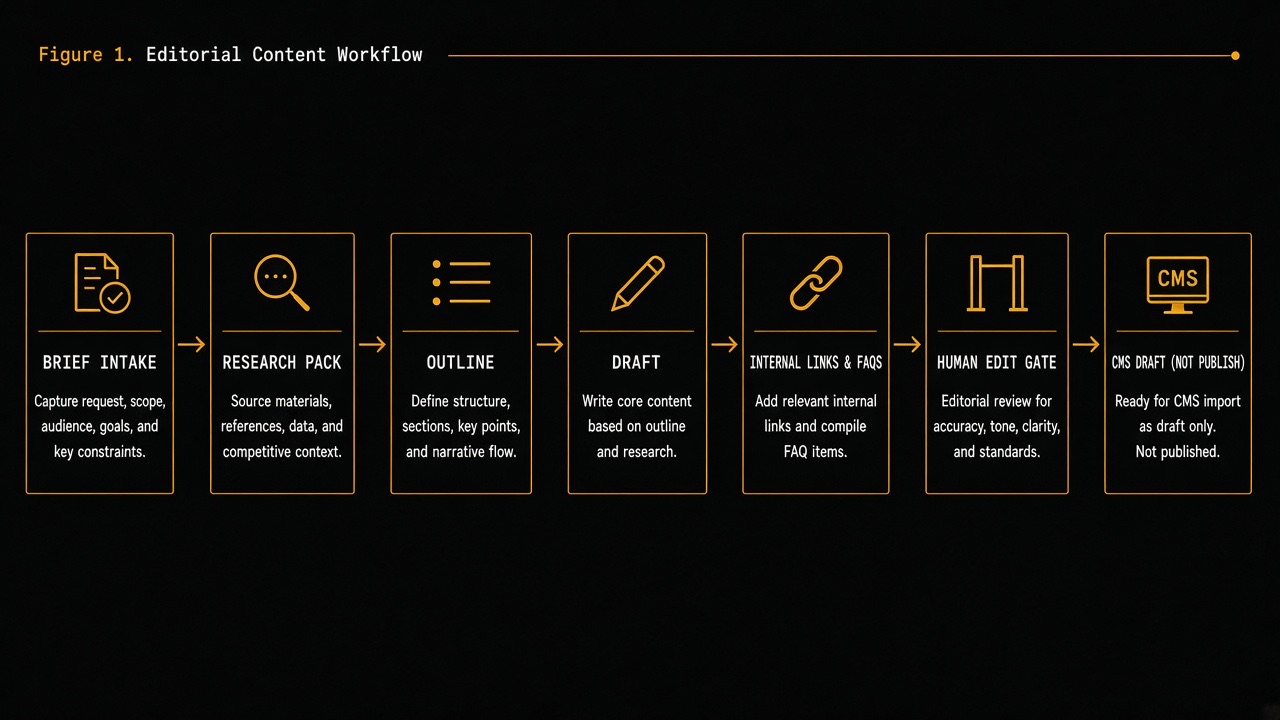
- Brief intake — form, Notion/Airtable row, or Slack slash command.
- Site corpus index — your published posts/pages for internal linking (RAG over your sitemap content).
- Stage runners — separate LLM calls with JSON schemas per stage.
- Validator — checks required sections, banned phrases, link allowlist.
- Edit gate — human UI (Notion doc, Google Doc, or CMS draft).
- CMS writer — creates draft only (WordPress REST, Contentful, or your JSON/CMS).
Step 0 — Define the brief schema
Garbage briefs create garbage drafts. Require fields:
| Field | Example | Why |
|---|---|---|
| Working title | How to build a content ops bot | Direction |
| Primary query | content ops automation AI | Intent |
| Audience | agency owners / marketing leads | Tone |
| Promise | pipeline they can ship in 2 weeks | Angle |
| Must include | edit gate, internal links, FAQs | Coverage |
| Must avoid | fake stats, “guaranteed rankings” | Risk |
| Series / cluster | Build Real AI Automations Part 4 | Internal links |
| CTA | /contact | Business |
| Sources to prefer | official API docs URLs | Grounding |
Store briefs in Airtable/Notion. Zapier/Make can trigger your runner, or call your API directly.
Step 1 — Build a research pack (before drafting)
Do not jump to prose. Generate a research JSON object:
people_also_ask— questions the article must answercompetitor_angles— what others cover (from titles/snippets you provide)evidence_gaps— claims that need a human-sourced exampleexternal_sources— URLs the writer may cite (allowlist only)internal_candidates— URLs from your site index with relevance scores
Feed the model your notes or exported SERP titles — or leave research semi-manual. Unbounded web browsing without an allowlist is how hallucinations and thin “AI SEO” pages happen. Google’s guidance on generative AI features still rewards people-first, evidence-dense pages (see Optimizing for generative AI features).
Step 2 — Outline stage (answer-first)
Force an outline schema:
quick_answer(2–4 sentences)sections[]withh2,goal,bullets, optionalh3stables_neededfaq_seedscta
Human checkpoint #1 (optional but recommended): approve outline before drafting. This prevents a full rewrite when the angle is wrong.
Step 3 — Draft stage with hard constraints
System rules to encode:
- Follow the approved outline order.
- No statistics unless present in the brief/research pack.
- No invented client names or results.
- Use brand voice tokens (short paragraphs, concrete verbs, agency POV).
- Include a Quick answer block and Key takeaways.
- Output HTML or Markdown matching your CMS template.
For HTML CMSs, prefer the same Gutenberg-style blocks you already use — or Markdown that a converter turns into blocks. Validate that required H2s exist before accepting the draft.
Step 4 — Internal links from your real site corpus
Index your published URLs (title, slug, excerpt, category, embeddings). After the draft exists:
- Retrieve top related posts/pages for the topic.
- Ask the model to propose 3–6 anchors with exact URLs from the candidate list only.
- Reject any link not in the allowlist.
- Prefer series neighbors (Parts 1–3) and money pages (
/services,/contact).
This is the same retrieval discipline as Part 2’s RAG support bot — your site is the knowledge base. For agent-oriented site readiness, see AI-agent ready websites.
Step 5 — FAQ generation for humans + schema
Generate 4–6 FAQs that match real buyer questions, not keyword spam. Each item needs:
questionanswer(plain text, 2–5 sentences)
Validate: answers must not contradict the draft; no new claims. These map cleanly to FAQPage JSON-LD when you publish (as your blog system already does).
Step 6 — SEO packet
Separate call that returns:
- 3 title options (≤ ~60 chars awareness)
- Meta description (~150–160 chars)
- Slug suggestion
- 5–8 keyword phrases
- OG blurb
Human picks the title. Models are fine at options; weak at final brand judgment.
Step 7 — Human edit gate (the product)
Ship drafts to a place editors already work:
- Notion/Google Doc with checklist
- CMS draft status =
draft/review - Git PR if your content is code-managed (as on this site’s JSON posts)
Editor checklist:
- Facts & sources verified
- No banned claims
- Internal links resolve
- Examples feel first-hand where promised
- Voice matches house style
- FAQs match on-page content
- Images/diagrams requested
Only after checklist → publish. Same philosophy as support: automate the draft, not the commitment.
CMS integrations
- WordPress REST API posts — create with
status=draft - Contentful / Sanity / other headless CMSs — draft entries
- Git-based content — open a PR; never push straight to production without review
Webhook security: signed requests, auth tokens in secrets, idempotent “brief_id” so retries do not spawn duplicate drafts.
Orchestration options
- Custom worker (Node/Python) — best control for agencies productizing the pipeline.
- Make / Zapier / n8n — fast MVP between form → LLM → Notion → Slack approve.
- LangGraph / workflow engines — when you need branching (outline reject → revise).
Keep stages separate. One mega-prompt is impossible to evaluate.
2-week MVP plan
Days 1–3 — Spec
- Brief schema + style guide excerpt + banned list.
- Article HTML/Markdown template.
- Success definition: “editor time to publish drops by X%.”
Days 4–7 — Stages
- Outline + draft JSON schemas + validators.
- Site corpus index for internal links.
- FAQ + SEO packet stages.
Days 8–11 — Edit gate
- Notion/Doc or CMS draft writer.
- Slack notification with brief + draft link.
- Run 5 real briefs end-to-end.
Days 12–14 — Measure
- Track edit distance / time-to-publish / factual fixes.
- Tune prompts only after measuring failures.
- Still no auto-publish.
Quality metrics
| Metric | What it tells you |
|---|---|
| Outline acceptance rate | Brief clarity + angle quality |
| Editor time to publish | Real ROI |
| Factual corrections per draft | Grounding gaps |
| Internal links accepted vs rejected | Corpus/retrieval quality |
| % drafts needing structural rewrite | Outline stage failure |
| Published performance (later) | Do not optimize week 1 |
Guardrails
- Allowlisted external domains for citations.
- Ban auto-publish feature flag (default off).
- PII scrubbing if briefs include client secrets.
- Version prompts; log model + prompt hash per draft.
- Separate “legal/medical/finance” topics into mandatory SME review.
- Copyright: do not paste competitor full text into prompts — use notes/titles.
Example pipeline output (shape)
Brief: “Part 4 content ops bot for agencies.”
Bot returns: quick answer → architecture → steps 0–7 → MVP → metrics → FAQs → SEO packet → suggested links to Parts 1–3 and /contact. Editor adds first-hand screenshots, tightens voice, verifies API URLs, then publishes.
Common failures
- One-shot “write 2000 words”: split stages.
- No site index: internal links become generic or wrong.
- Fake stats: forbid numbers unless provided.
- Publishing from Zapier: always draft status.
- Skipping outline approval: expensive rewrites.
- Ignoring editor metrics: you will tune prompts blindly.
What Part 5 will cover
Next: Lead Follow-Up Sequences Without Looking Spammy — email/SMS automation triggered by form events, delays, stop rules, and CRM logging that protects deliverability.
Key takeaways
- Content ops bots are pipelines, not magic publish buttons.
- Brief schema + research pack beat bigger models.
- Internal links must come from an allowlisted site corpus.
- FAQs and SEO packets are first-class outputs.
- Human edit gate is mandatory; measure editor time saved.
Want this pipeline wired for your agency or content team — brief form, staged LLM workers, internal-link index, and CMS drafts? Talk to Let Start Design. We build the sites and the content systems that keep quality under human control.
Related: Part 3 — Shopify order status bot · Part 2 — Support triage bot · Part 1 — Lead-qualification bot · Agents vs chatbots vs copilots
Sources: Google — Optimizing for generative AI features; WordPress REST API — Posts; Contentful developer docs; Structured model outputs.


