

Quick answer: An appointment-booking agent should collect intent, check real calendar availability, propose only valid slots, confirm details, write the event, and log the lead — with hard guardrails for hours, buffers, blackouts, time zones, and escalation. Do not let the model invent open times or promise meetings the calendar cannot hold. Build it as tools + rules + LLM assist, not as unbounded chat.
This guide shows how to build a production-minded appointment-booking agent with calendar APIs and guardrails — the same discipline we use in our Build Real AI Automations series for lead qualification and support triage. If you are still choosing product shape, start with AI agents vs chatbots vs copilots.
At Let Start Design we ship booking flows for agencies and brands that cannot afford double-bookings, timezone chaos, or a bot that “sounds booked” while the calendar stays empty. Below is the architecture, guardrail list, build steps, and how we outperform freelancers and typical chatbot shops on bigger projects.

What the booking agent should (and should not) do
It should:
- Ask why the visitor wants to meet (demo, consult, support, partner call)
- Collect name, email, timezone, and optional company/budget band
- Read availability from Google Calendar, Microsoft 365, Cal.com, or similar
- Offer 2–4 real slots with buffers already applied
- Confirm summary before write
- Create the event + optional Meet/Teams link
- Write the lead to CRM / webhook / email notification
- Escalate to a human when rules fail or confidence is low
It should not:
- Invent open times without an availability API response
- Promise pricing, discounts, or SLAs unless those answers are allowlisted
- Book outside business hours or into blackout dates
- Overwrite existing events or ignore meeting buffers
- Auto-book VIP / enterprise deals without a human gate (optional but smart)
Architecture
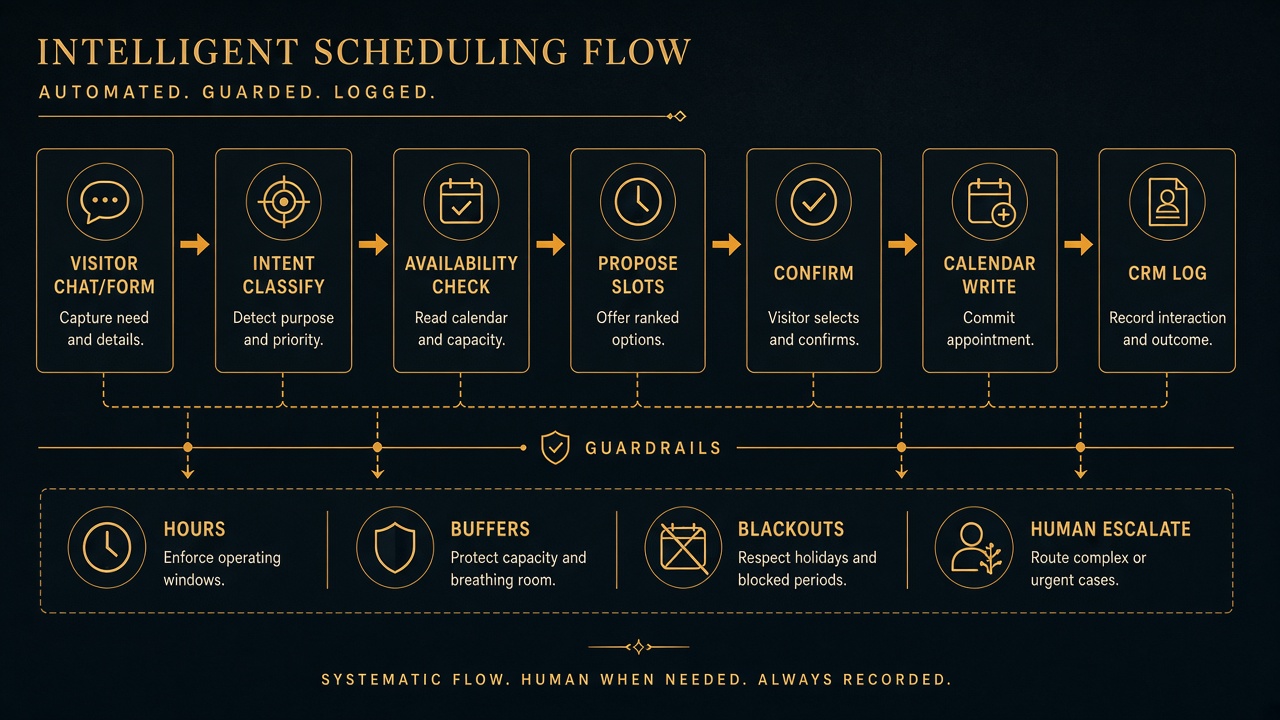
- Channel — website widget, WhatsApp, or embedded form-first chat
- Orchestrator — your API route (Node) or workflow tool (n8n/Make) with tool calling
- LLM — extracts slots (intent, timezone, preferences) into JSON — does not decide availability
- Calendar tool — free/busy + create event with service account or OAuth
- Policy engine — hard rules (hours, duration, buffers, blackouts, max/day)
- CRM / notify tool — HubSpot, Salesforce, Notion, Slack, or email
- Audit log — store proposal, chosen slot, event ID, model version
Guardrails checklist (non-negotiable)
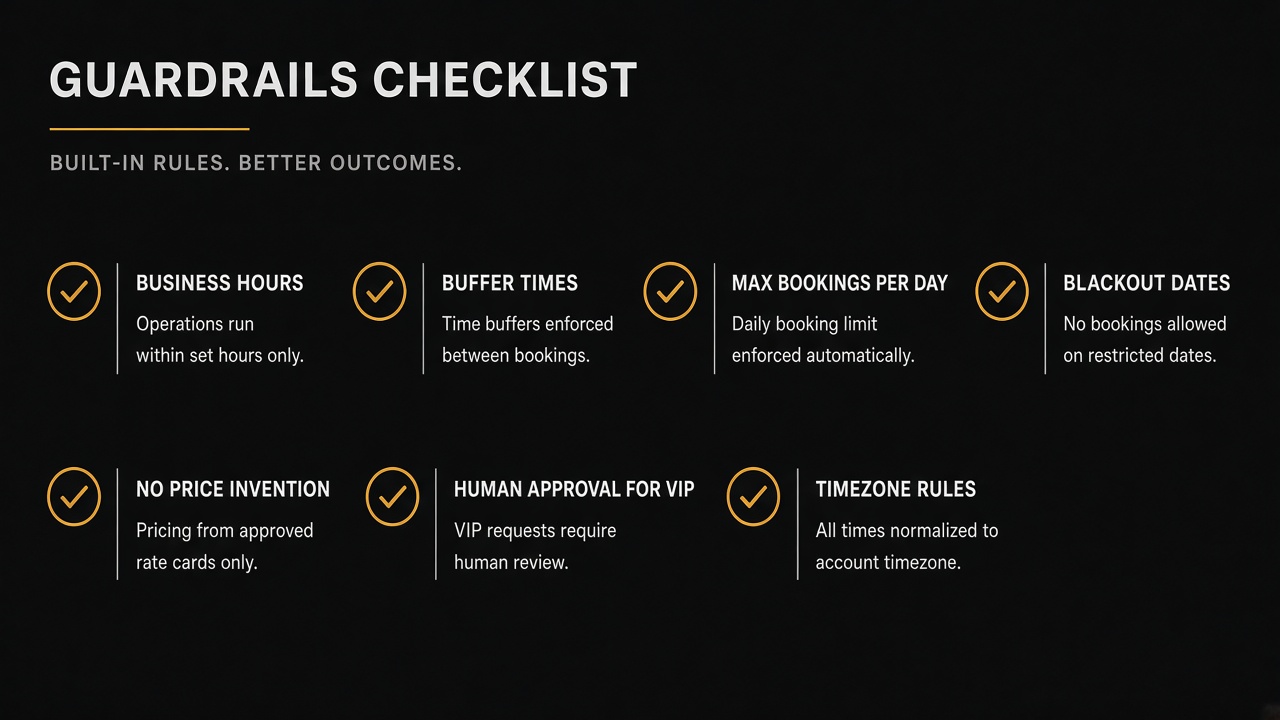
| Guardrail | Example rule | Failure if missing |
|---|---|---|
| Business hours | Mon–Fri 10:00–18:00 Asia/Karachi | Weekend spam bookings |
| Meeting length | 30 or 45 minutes only | Random durations |
| Buffers | 15 minutes before/after | Back-to-back collisions |
| Lead time | No bookings < 4 hours out | Impossible same-hour demos |
| Horizon | Next 14 days only | Chaos far ahead |
| Blackouts | Holidays + travel blocks | No-shows / anger |
| Cap per day | Max 6 consults | Burnout / quality drop |
| Timezone | Store IANA tz; display local | Wrong clock disasters |
| Identity | Verified email before write | Fake bookings |
| Claims | No invented pricing | Legal / sales debt |
| Escalate | VIP / custom / low confidence → human | Bad enterprise commits |
Trick: Keep guardrails in config (JSON/YAML), not buried in a mega-prompt. Prompts drift. Config can be tested.
Step-by-step build guide
Step 1 — Define meeting types
Map each intent to duration, calendar, and host:
consult→ 30 min → sales calendartechnical→ 45 min → solutions calendarpartner→ 30 min → partnerships calendar + human approve
If you also qualify leads first, chain this after your lead-qualification bot so only ICP-fit traffic reaches booking.
Step 2 — Connect calendar as the source of truth
Use free/busy or availability APIs — Google Calendar, Microsoft Graph, Cal.com, Calendly API, or similar. The LLM never “guesses” open slots. Your tool returns candidate ISO timestamps; the model only helps phrase them.
Official references worth bookmarking: Google Calendar API and Microsoft Graph calendar.
Step 3 — Schema the conversation state
Persist structured state (Redis, DB, or workflow store):
intent,durationMin,timezoneemail,name,companyproposedSlots[](from API)selectedSlotconfirmationTokeneventIdafter write
Use structured outputs / JSON mode so the model fills fields — then validate with Zod/Joi before any calendar call.
Step 4 — Propose slots in the UI
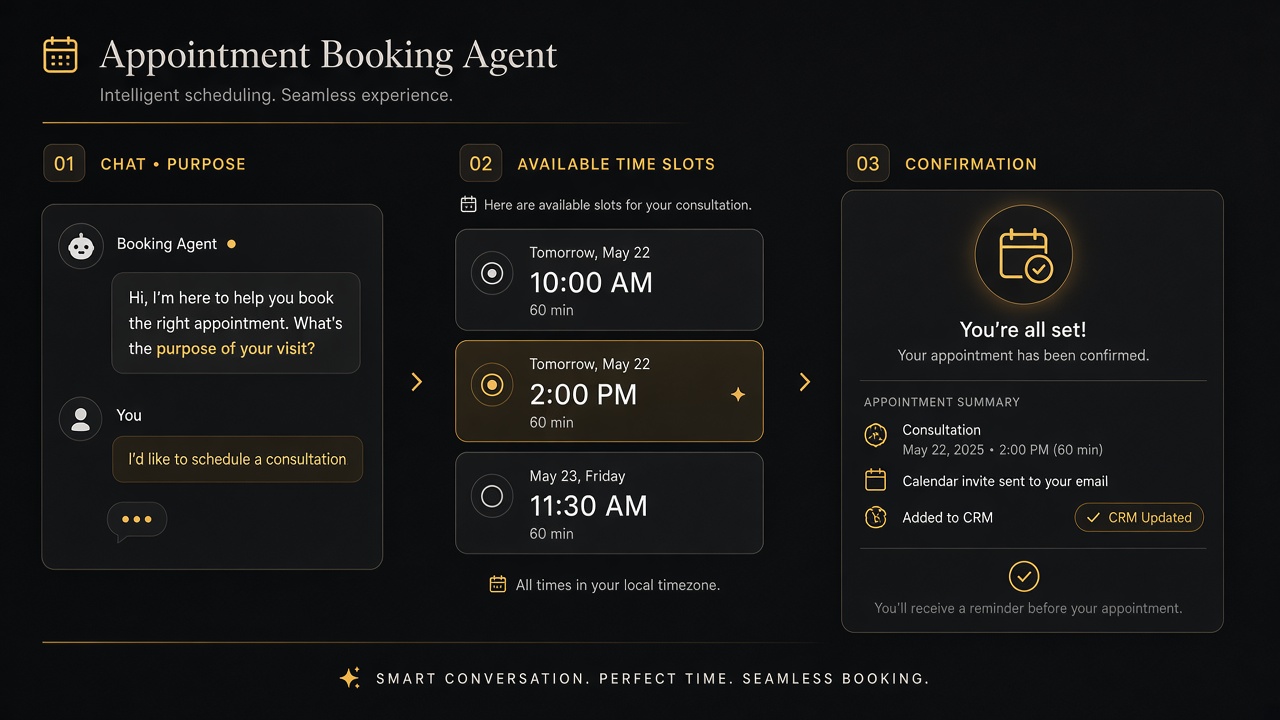
Show 2–4 slots as buttons. Include timezone label. On select, show a confirmation card: who, when, duration, video link policy, cancel policy. Only then call createEvent.
Step 5 — Idempotent calendar write
- Generate a client
bookingKey(email + slot start + meeting type) - If the key exists, return the existing event — do not double-create
- Re-check free/busy immediately before write (race condition window)
- On conflict, apologize and offer refreshed slots
Step 6 — Notify and CRM
After success: email both parties, Slack the sales channel, upsert CRM deal/contact with source = booking_agent, store event ID for reschedule/cancel tools later.
Step 7 — Reschedule / cancel tools
Ship day-two tools with the same guardrails: verify email ownership (magic link or code), only allow changes inside policy, never delete unrelated events.
Pseudo-flow (tool calling)
- User: “Book a website consult next week afternoons PKT.”
- Model →
extract_booking_prefsJSON - Server validates prefs against policy
- Server →
get_availability(calendar + buffers) - Model phrases 3 slots; UI renders buttons
- User picks slot →
confirm_booking - Server re-checks free/busy →
create_event→crm_upsert - Reply with confirmation + add-to-calendar links
2-week MVP plan
- Days 1–3: Meeting types, policy config, calendar OAuth/service account
- Days 4–7: Availability + propose + confirm write with idempotency
- Days 8–10: Website widget + email/Slack notifications
- Days 11–12: CRM upsert + audit log
- Days 13–14: Conflict tests, timezone tests, escalation path
Quality metrics
| Metric | Why it matters |
|---|---|
| Booking completion rate | Funnel health |
| Double-book incidents | Guardrail failure |
| Timezone correction rate | UX clarity |
| No-show rate | Reminders / lead quality |
| Escalation rate | Policy tightness |
| Time-to-book (median) | Agent efficiency |
Common failures
- Letting the LLM “remember” availability from chat history
- Ignoring daylight-saving and IANA timezones
- No re-check before write (two users grab one slot)
- Booking without verified email
- Mixing sales and support calendars without routing rules
- Shipping WhatsApp booking with no human escape hatch
Freelancer vs chatbot agency vs specialist studio
A demo that books sometimes is easy. A booking system that survives real traffic, multi-host calendars, and sales ops is a different product — especially on bigger projects.
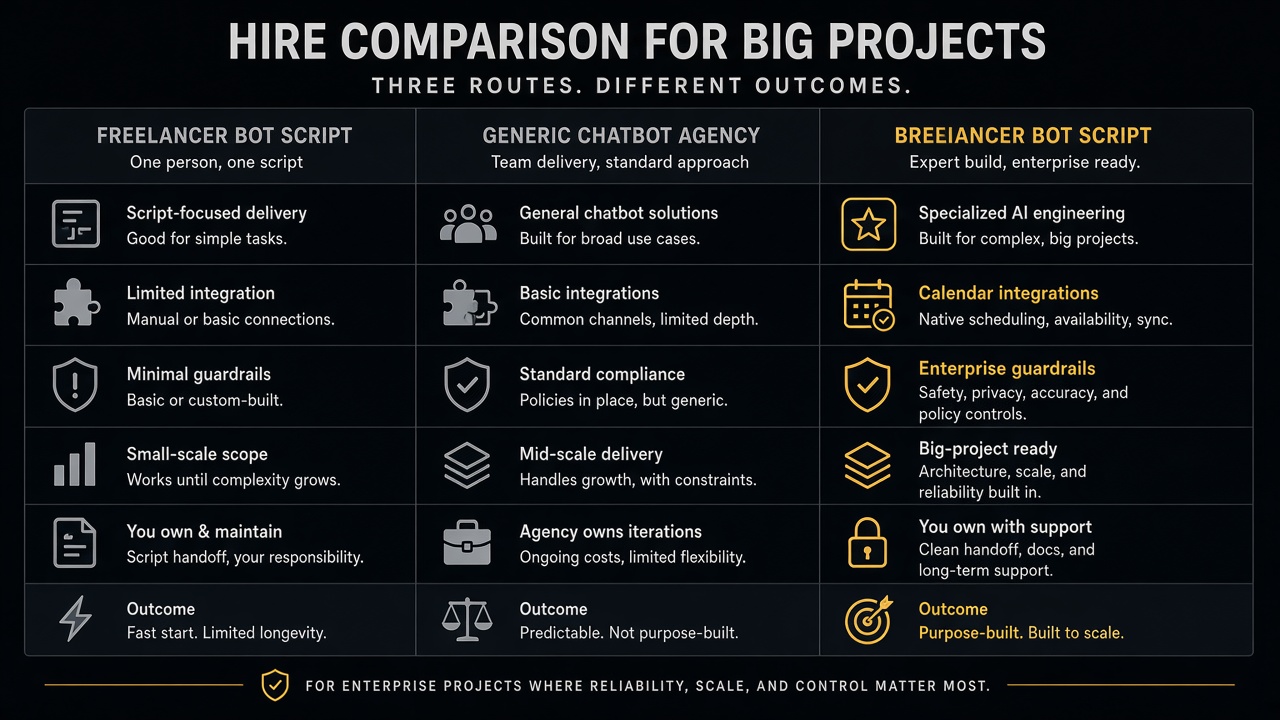
| Solo freelancer | Typical chatbot agency | Let Start Design | |
|---|---|---|---|
| Calendar depth | Often one Calendly link in disguise | Widget-first, weak edge cases | Policy engine + real free/busy + idempotent writes |
| Guardrails | Prompt-only | Generic business-hours toggle | Config-tested rules, audit logs, escalation |
| Website + agent | Split freelancers | Chat bolted on | Site + agent + CRM under one delivery team |
| Big-project capacity | Single point of failure | Juniors on integrations | Structured build, QA, and launch support |
| Commercial clarity | Hourly surprises | Opaque bot retainers | Scope via Project Builder + fixed proposals |
| Best for | Tiny experiments | FAQ bots that rarely book | Revenue-critical booking on marketing sites |
How Let Start Design stands out
1) Agents with product discipline
We treat booking agents like production software: schemas, tools, tests, and human gates — the same standard as our lead-qualification and support bots. See also what clients should expect from an AI website agency in 2026.
2) Website + conversion in one engagement
Most freelancers ship a widget orphan. We wire booking into the site IA, CTAs, and analytics — often alongside AI website development or a redesign — so the agent is part of the funnel, not a sticker.
3) Guardrails before personality
Charming copy that double-books is a liability. We implement hours, buffers, blackouts, idempotency, and escalation in code first — then tone.
4) Transparent scoping for bigger builds
Multi-calendar routing, CRM sync, WhatsApp, and reschedule flows change cost. Model related website and integration scope in our Project Builder, then we quote the agent work with clear milestones.
5) Capacity agencies can white-label
Agency partners can deliver booking agents under their brand through our white-label program — useful when clients want “AI scheduling” but you need a studio that will still be answering Slack in week eight.
6) Portfolio proof, not slideware
We ship real sites and systems — browse the portfolio — and we finish messy AI starts instead of abandoning them when demos meet production.
Key takeaways
- Calendars are the source of truth; LLMs extract preferences and talk politely.
- Guardrails belong in config and code: hours, buffers, blackouts, caps, timezone, identity.
- Confirm UI + idempotent writes prevent most double-booking pain.
- Measure completion, conflicts, no-shows, and escalations.
- For bigger projects, hire a studio with integration capacity — Let Start Design combines agent engineering, website conversion, pricing clarity, and partner delivery.
Want a booking agent that respects your calendar and your sales process? Talk to Let Start Design, explore AI website development, or start scoping related site work in the Project Builder.
Related: Lead-qualification bot · Support triage bot · Agents vs chatbots vs copilots · AI-agent ready websites
Sources: Google Calendar API; Microsoft Graph Calendar; Tool / function calling.


