

Quick answer: A lead-qualification bot asks a short set of business questions on your website (and optionally WhatsApp), scores the answers against your ICP rules, writes the lead into your CRM with a stage/tag, and routes hot leads to a human for booking — while nurturing or declining the rest. Build it as a workflow (form → rules/LLM assist → CRM → WhatsApp), not as an unbounded chat that invents prices or promises.
This is Part 1 of our Build Real AI Automations series — practical builds agencies and brands can ship. If you are still choosing product shape, start with AI agents vs chatbots vs copilots. This post assumes you want a qualification pipeline that protects sales time without sounding robotic.
At Let Start Design, we see the same failure mode repeatedly: teams paste a generic website chatbot on the homepage and hope it “qualifies leads.” It asks vague questions, hallucinates timelines, and dumps garbage into the CRM. A real qualification bot is narrower, measurable, and boring in the best way.
What a lead-qualification bot is (and is not)
It is
- A structured intake flow on web and/or WhatsApp.
- A scoring layer that maps answers to Hot / Warm / Cold / Disqualify.
- A CRM writer that creates or updates contacts with source, score, and notes.
- A routing layer that notifies sales (or books a calendar) for Hot leads.
- A loggable system with transcripts, failures, and human takeover.
It is not
- A free-form “ask anything about our company” agent with no CRM destination.
- An auto-sender that quotes fixed prices from vibes.
- A replacement for discovery calls on complex custom projects.
- A black-box LLM with no allowlist of topics and no kill switch.
Design rule: automate intake and triage. Keep negotiation, scoping, and commitment human.
Architecture overview
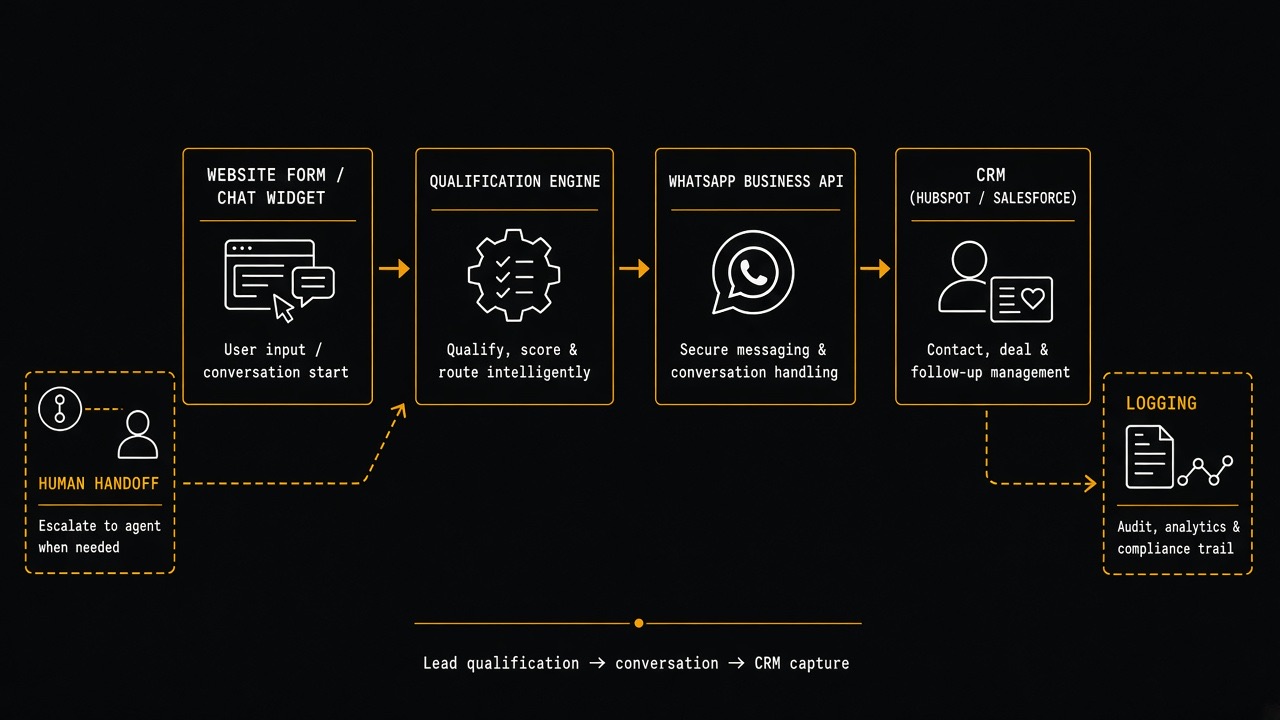
Recommended components:
- Capture layer — website form, embedded chat widget, or WhatsApp entry point.
- Qualification engine — deterministic rules first; optional LLM for normalizing messy answers.
- Messaging layer — WhatsApp Cloud API (Meta) for follow-ups and status updates.
- CRM layer — HubSpot, Salesforce, Pipedrive, or Zoho via official APIs.
- Handoff layer — Slack/email alert + calendar link (Cal.com / Calendly) for Hot leads.
- Observability — store transcript, score breakdown, API errors, and consent flags.
Step 0 — Define your Ideal Customer Profile (ICP) scorecard
Do not write bot prompts before you write scoring rules. Example scorecard for a web design / development agency:
| Signal | Question | Hot | Warm | Cold / Disqualify |
|---|---|---|---|---|
| Budget | What budget range are you considering? | Fits your mid/high package | Needs discovery | Far below minimum or “free” |
| Timeline | When do you need to launch? | 30–90 days | Flexible / 3–6 months | “Tomorrow” with huge scope |
| Project type | What do you need built? | Website, Shopify, WordPress, redesign + SEO | Unclear but serious | Logo-only / homework help |
| Decision maker | Are you the decision maker? | Yes / shared with partner | Influencer researching | Student / no authority |
| Fit | Industry / region | Served verticals | Adjacent | Outside policy (illegal niches, etc.) |
Assign points (for example Budget 0–3, Timeline 0–2, Fit 0–2). Thresholds:
- Hot (8–10): notify sales within 5 minutes + offer booking link.
- Warm (5–7): CRM nurture sequence + soft WhatsApp follow-up.
- Cold (1–4): resource email, no sales ping.
- Disqualify (0 or policy hit): polite close, no CRM spam.
Step 1 — Build the website capture (form first, chat second)
Start with a form. Forms beat open chat for qualification because answers are structured and easier to score.
Minimum fields
- Name
- Work email
- Phone / WhatsApp number (with country code)
- Company / website URL
- Project type (select)
- Budget range (select)
- Timeline (select)
- Short description (textarea, 300–600 chars)
- Consent checkbox (privacy + WhatsApp contact permission)
Post the form to your backend (Next.js route handler, WordPress REST endpoint, or serverless function). Validate server-side. Never trust client-only scoring.
Optional chat widget: use chat only to collect the same fields conversationally. Map each bot turn to a field ID. If the user wanders off-script, return to the next unanswered field — do not free-chat forever.
Step 2 — Implement the qualification engine
Use rules first. Add an LLM only where language is messy.
Deterministic scoring (pseudo-logic)
Example:
- If budget = “Under $500” → Disqualify (policy).
- If project_type = “Custom website” and budget in mid/high band → +3.
- If timeline = “ASAP (< 2 weeks)” and scope = “full redesign + ecommerce” → flag
risk_unrealistic_timeline, still allow Warm but require human review. - If email domain is free (gmail/yahoo) and company URL missing → −1 (not automatic disqualify).
Where LLMs help (safely)
- Normalize free-text (“we need a shop kinda like Nike but cheaper”) → structured tags:
ecommerce,shopify_candidate,brand_store. - Summarize the description into a 2-line sales brief.
- Detect language and translate fields for your sales team.
Hard constraints for the model:
- No pricing quotes.
- No legal/medical claims.
- No inventing case studies.
- Output JSON only against a schema your code validates.
If validation fails, fall back to rules-only scoring and mark llm_failed=true in the CRM note.
Step 3 — Connect WhatsApp the right way
Use Meta’s official WhatsApp Cloud API get-started guide. Avoid unofficial “WhatsApp web scrapers” — they break Terms of Service and get numbers banned.
Setup checklist
- Create a Meta Business portfolio and app.
- Add the WhatsApp product; choose Cloud API.
- Register a business phone number (or use the test number first).
- Generate a permanent system user access token for production.
- Configure a webhook endpoint for inbound messages and delivery statuses.
- Submit message templates for outbound business-initiated messages (outside the 24-hour customer care window).
Read Meta’s rules on the send messages guide and message templates. Template quality and category affect delivery.
Recommended WhatsApp behaviors
- Hot lead: send a confirmation + booking link within minutes (user replies; otherwise use an approved template).
- Warm lead: “Thanks — we received your brief. A specialist will follow up within one business day.”
- Inbound questions: answer only from an allowlisted FAQ set; otherwise hand off.
- Opt-out: honor STOP / unsubscribe instantly and sync to CRM.
If you need multi-channel SMS as backup, providers like Twilio’s WhatsApp documentation can sit in front of the same Cloud API patterns — still treat compliance as first-class.
Step 4 — Write leads into your CRM
Pick one CRM and use the official API. Examples:
Fields to always store
- Contact identity (email, phone, name, company, website)
lead_source= website_qualification_botqualification_score+qualification_band(Hot/Warm/Cold/DQ)score_breakdown(JSON or note)project_type,budget_band,timelinetranscript_urlor pasted summaryconsent_whatsapp,consent_marketing, timestamp, IP (as your privacy policy allows)- Owner / pipeline stage
Idempotency: upsert by email or phone so refreshes do not create duplicates. If both exist and conflict, prefer email as primary key and attach phone as a secondary property.
CRM automation examples
- Hot → create deal in “Qualified” stage + Slack notify #sales.
- Warm → enroll in “Website Warm Nurture” sequence.
- Cold → add to monthly newsletter only if marketing consent is true.
- DQ → tag
disqualified_botand suppress sales tasks.
Step 5 — Human handoff that sales will actually use
Hot leads die when the bot “succeeds” but humans ignore the alert. Design handoff deliberately:
- Immediate Slack/email with score, budget, timeline, website, and 2-line summary.
- One-click CRM record link.
- One-click calendar link prefilled with UTM/source.
- WhatsApp thread ownership: bot pauses when a human replies (session lock).
- SLA: first human touch in 15 minutes during business hours; after-hours auto-message with next availability.
Calendar tools with scheduling APIs/embeds (for example Cal.com docs) keep booking inside the same flow.
Step-by-step build plan (2-week MVP)
Days 1–2 — Spec
- Write ICP scorecard and disqualify rules.
- Draft form fields + WhatsApp template copy.
- Choose CRM + define properties.
- Write privacy/consent language with your counsel or policy owner.
Days 3–5 — Capture + score
- Ship website form UI + API endpoint.
- Implement rules engine + unit tests for scoring edge cases.
- Store submissions in a database table before CRM write (replay safety).
Days 6–8 — CRM + alerts
- Upsert contacts/deals.
- Wire Slack/email for Hot band.
- Add idempotent retries with exponential backoff.
Days 9–11 — WhatsApp
- Connect Cloud API + webhook.
- Approve templates.
- Send confirmation messages by band.
- Implement STOP handling.
Days 12–14 — Harden + launch
- Add rate limits, honeypot, and basic bot spam checks.
- Run 20 synthetic leads through all bands.
- Train sales on the Slack alert format.
- Launch on one high-intent page first (Contact / Pricing / Service page), not the entire site.
Conversation scripts that convert (copy-ready)
Web form success (Hot)
“Thanks — based on your answers, this looks like a strong fit. Book a 20-minute discovery call here: {calendar_link}. We also sent a WhatsApp confirmation.”
WhatsApp confirmation template (concept)
“Hi {name}, we received your {project_type} request for {company}. Our team will review it shortly. If you want to lock a time now, book here: {calendar_link}. Reply STOP to opt out.”
Disqualify (polite)
“Thanks for reaching out. From what you shared, we’re probably not the right partner for this scope/budget. Here’s a free guide that may help: {resource_link}. If things change, we’re here.”
Guardrails, privacy, and compliance
- Consent: collect explicit permission before WhatsApp marketing or non-essential follow-ups. Link your privacy policy.
- Data minimization: do not ask for passwords, payment card data, or government IDs in the bot.
- Retention: define how long transcripts live.
- Access control: CRM tokens in a secrets manager; never in frontend code.
- Regional rules: if you serve EU/UK users, align with GDPR guidance from the European Commission data protection overview and your DPA obligations.
- Meta commerce/policy: follow WhatsApp commerce and business policy updates inside Meta’s developer docs — categories and template enforcement change.
QA checklist before you go live
- Every budget/timeline combination produces the expected band.
- Duplicate submissions upsert, not duplicate.
- CRM write failure still stores the lead locally and retries.
- WhatsApp failure still creates the CRM record and emails sales.
- STOP removes WhatsApp outreach immediately.
- Human reply pauses the bot for that conversation.
- No LLM path can emit a price, guarantee, or fake case study.
- Mobile form completion under 90 seconds for the happy path.
KPIs that prove the bot works
| KPI | Why it matters | Healthy starting target |
|---|---|---|
| Form completion rate | Friction check | Improve week-over-week |
| % Hot leads | ICP filter quality | Often 10–25% of submissions |
| Speed-to-first-human-touch | Revenue leakage | < 15 min business hours |
| Booked calls from Hot | Handoff quality | Track by source page |
| Sales-rejected “Hot” leads | Scorecard drift | < 15% after tuning |
| WhatsApp opt-out rate | Message quality | Investigate if spiking |
Common failures (and fixes)
- Bot asks 12 questions: cut to 6–8. Move deep discovery to the call.
- Everything becomes Hot: tighten budget/timeline thresholds; add disqualify rules.
- CRM spam duplicates: upsert keys + debounce identical submits within 10 minutes.
- WhatsApp templates rejected: remove promotional wording; keep transactional utility clear.
- Sales ignores Slack: put owner rotation + SLA; include calendar link in the alert itself.
- LLM invents scope: remove free-chat; constrain to field-filling + JSON summary.
Tooling options (build vs buy)
- Build: Next.js/Node qualification API + WhatsApp Cloud API + HubSpot/Salesforce — maximum control, best for agencies productizing the flow.
- Assemble: form tool + Make/Zapier + CRM native forms — faster MVP, weaker transcript control.
- Buy chat UI: Intercom/Drift-style widgets — fine for capture UX, still require your scoring rules and CRM field discipline.
Whatever you choose, keep the scorecard and handoff SLA in your system of record. Vendors should not own your qualification logic.
What Part 2 will cover
Next in this series: Build a Support Triage Bot That Drafts Replies (Not Sends Them) — connecting helpdesk tickets to a RAG layer over your docs/FAQs, with human approval before send. That build shares the same guardrail mindset as this qualification bot.
Key takeaways
- Qualification bots are workflows: capture → score → CRM → WhatsApp → human handoff.
- Write the ICP scorecard before any prompt engineering.
- Prefer structured forms; use chat only to fill the same fields.
- Use official WhatsApp Cloud API + CRM APIs — skip unofficial hacks.
- Automate triage, not commitments. Measure Hot→booked and sales-rejected Hot leads.
Want this pipeline implemented on your site (form, scoring, WhatsApp, CRM, and sales alerts) without a science project? Talk to Let Start Design. We build conversion-focused websites and the automation layers that keep sales time on real opportunities.
Related: AI agents vs chatbots vs copilots · Make your website AI-agent ready · Contact · Services
Sources: WhatsApp Cloud API; Cloud API get started; WhatsApp message templates; HubSpot Contacts API; Twilio WhatsApp docs; Cal.com docs.


