

Quick answer: In 2026, brands should not pick “AI” as a product — they should pick a job. Use a chatbot when visitors need fast answers inside a fixed scope. Use a copilot when your team (or power users) need AI beside a workflow they still own. Use an AI agent when the system must plan multi-step work, call tools, and complete outcomes with clear permissions and audit trails. Most brands win with a staged stack: chatbot → copilot → agent — not an overnight “full agent” rebuild.
If your roadmap still says “add ChatGPT to the website,” you are already behind the real decision. Buyers, ops teams, and Search experiences now collide with three different product shapes that get sold under the same buzzword. This guide separates them with a practical framework we use in discovery workshops at Let Start Design — so you invest in the right interface, not the trendiest demo.
It connects to our deeper builds on WebMCP for agent-usable websites, AI-agent readiness (llms.txt + accessibility), and Search visibility in Google AI Overviews citations.
Chatbot vs copilot vs AI agent: definitions that actually hold up
What is a chatbot?
A chatbot is a conversational interface optimized for Q&A and guided paths. It maps intents to answers, FAQs, tickets, or simple actions (book a slot, capture a lead). The user stays in a chat surface; the system rarely owns a long multi-tool plan.
- Best at: support deflection, FAQ, lead qualification, order status lookups
- Weak at: open-ended research across systems, changing site UI, unsupervised purchases
- Failure mode: hallucinated policy answers when knowledge is stale or uncited
What is a copilot?
A copilot sits beside a human workflow — CMS editor, CRM, design tool, analytics dashboard, checkout admin. It drafts, suggests, and accelerates; the human keeps final control. Copilots shine when expertise is scarce and review is cheap.
- Best at: drafting content, summarizing tickets, suggesting next steps, filling forms with review
- Weak at: fully unsupervised customer-facing execution
- Failure mode: silent over-trust — teams ship drafts without checking facts or brand voice
What is an AI agent?
An AI agent is goal-directed software that can plan, use tools, and iterate until an outcome is reached (or it safely stops). On the web, that may mean calling APIs, filling structured forms, or using browser tools — ideally through explicit site capabilities rather than brittle screenshot guessing. See Google’s direction on agentic web tooling via Web Machine Learning / emerging web agent standards and our WebMCP guides for implementation shape.
- Best at: multi-step tasks (quote → schedule → confirm), ops runbooks, research + action loops
- Weak at: ambiguous goals with no success criteria or permission model
- Failure mode: “helpful” actions without consent, logging, or rollback
Side-by-side comparison (2026 buyer table)
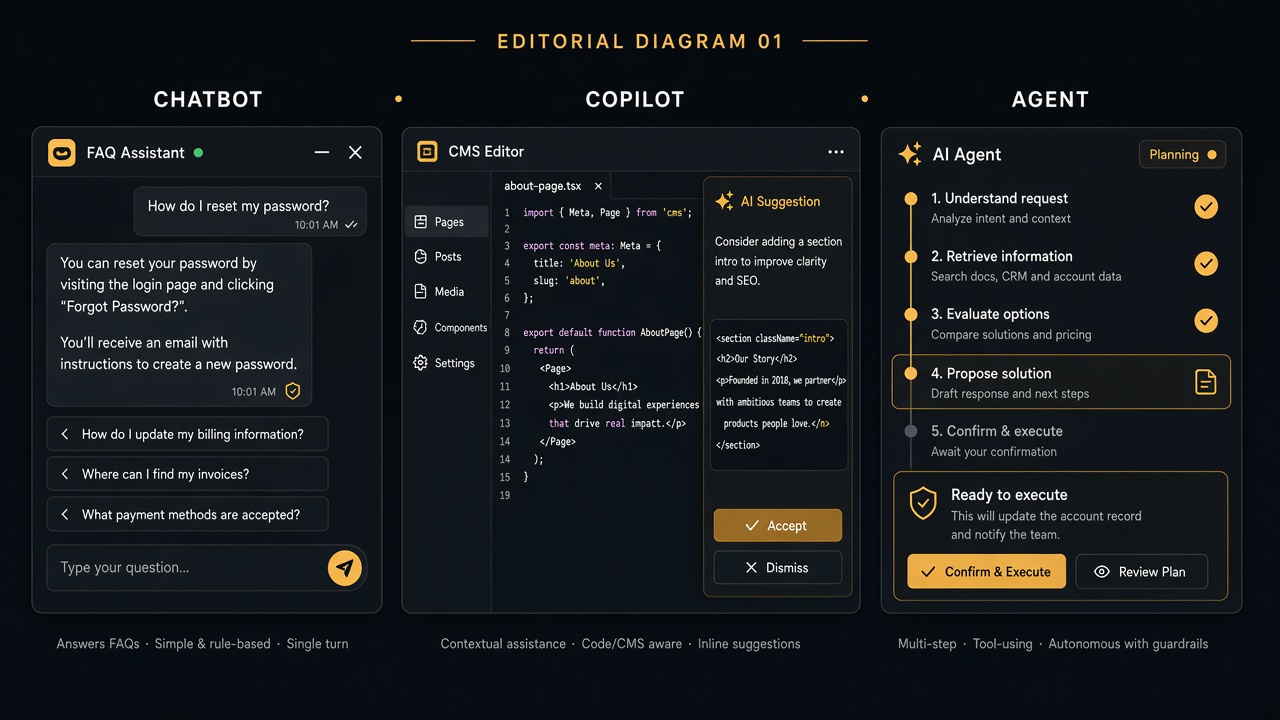
| Dimension | Chatbot | Copilot | AI agent |
|---|---|---|---|
| Primary user | Customer / visitor | Employee or power user | Customer or ops (with permissions) |
| Core job | Answer & route | Assist & accelerate | Plan & complete outcomes |
| Autonomy | Low | Medium (human-in-loop) | High (bounded by tools/policy) |
| Typical UI | Chat widget | Inline panel / slash commands | Chat + tool calls + status / confirmations |
| Data needs | FAQ + CRM snippets | Product context + user history | APIs, schemas, audit logs, permissions |
| Website readiness | Clear FAQs, help center | Stable admin UX | Crawlable answers + agent APIs (e.g. WebMCP) + a11y tree |
| Risk if wrong | Bad answers, ticket spam | Brand/process drift | Unauthorized actions, compliance issues |
| Time-to-value | Days–weeks | Weeks | Weeks–months (do it in stages) |
The Intent–Autonomy Matrix (our unique decision framework)
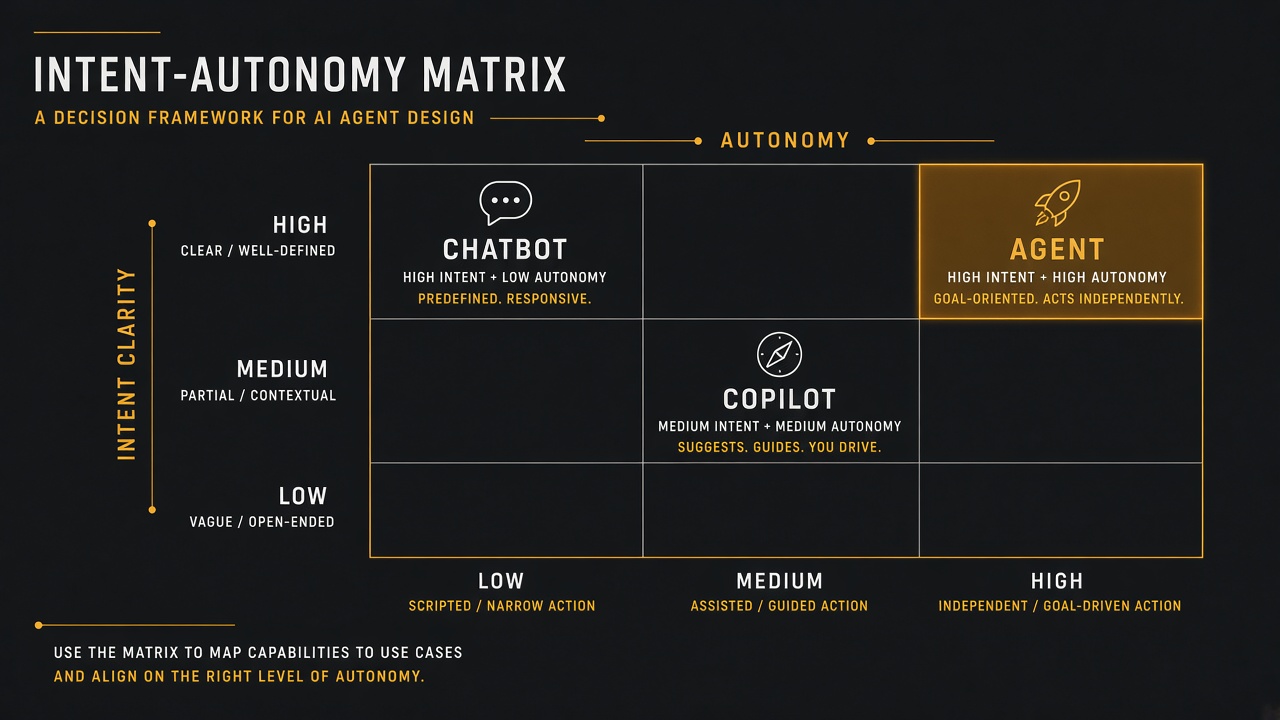
In client workshops we score every “AI idea” on two axes from 1–5:
- Intent clarity — Can a user state a crisp goal in one sentence? (1 = vague chat, 5 = “reschedule Tuesday install”)
- Action autonomy — How many systems must change without a human click? (1 = read-only answer, 5 = multi-system write)
| Intent ↓ / Autonomy → | Low autonomy (1–2) | Medium (3) | High (4–5) |
|---|---|---|---|
| High intent clarity | Smart FAQ chatbot | Copilot that drafts the ticket/email | Agent that executes with confirmation gates |
| Medium clarity | Guided chatbot flows | Copilot with suggested options | Agent only with clarifying questions first |
| Low clarity | Human handoff chatbot | Research copilot (no writes) | Do not build an agent yet |
Unique agency rule: if autonomy ≥ 4 and intent clarity ≤ 2, pause. That combo creates expensive demos that fail in production. Fix intent design (forms, schemas, success criteria) before agent tooling.
What brands should build in 2026 (by business model)
Service businesses & agencies
- Start: website chatbot for scope/pricing FAQs + human handoff
- Add: internal copilot for proposal drafts, SOW checklists, SEO briefs
- Later: agent that qualifies a lead, books a discovery call, and writes a CRM note — with staff approval on anything billable
Ecommerce & DTC
- Start: order-status + returns chatbot grounded in real order APIs
- Add: merchandiser copilot for product copy variants (human publish)
- Later: agent for “find in stock + apply eligible discount + prepare checkout” — never silent payment capture without explicit user confirmation
SaaS & product companies
- Start: in-app chatbot for docs + troubleshooting trees
- Add: product copilot inside the app (slash commands, explain-this-chart)
- Later: agents for onboarding runbooks and admin automation with role-based tool access
Local / multi-location brands
- Prioritize NAP-consistent answers (chatbot + site content) before agents
- Copilots help staff reply to reviews with brand-safe drafts
- Agents for booking only after calendar inventory and cancellation policy are machine-readable
The 2026 Build Ladder (sequence that reduces waste)
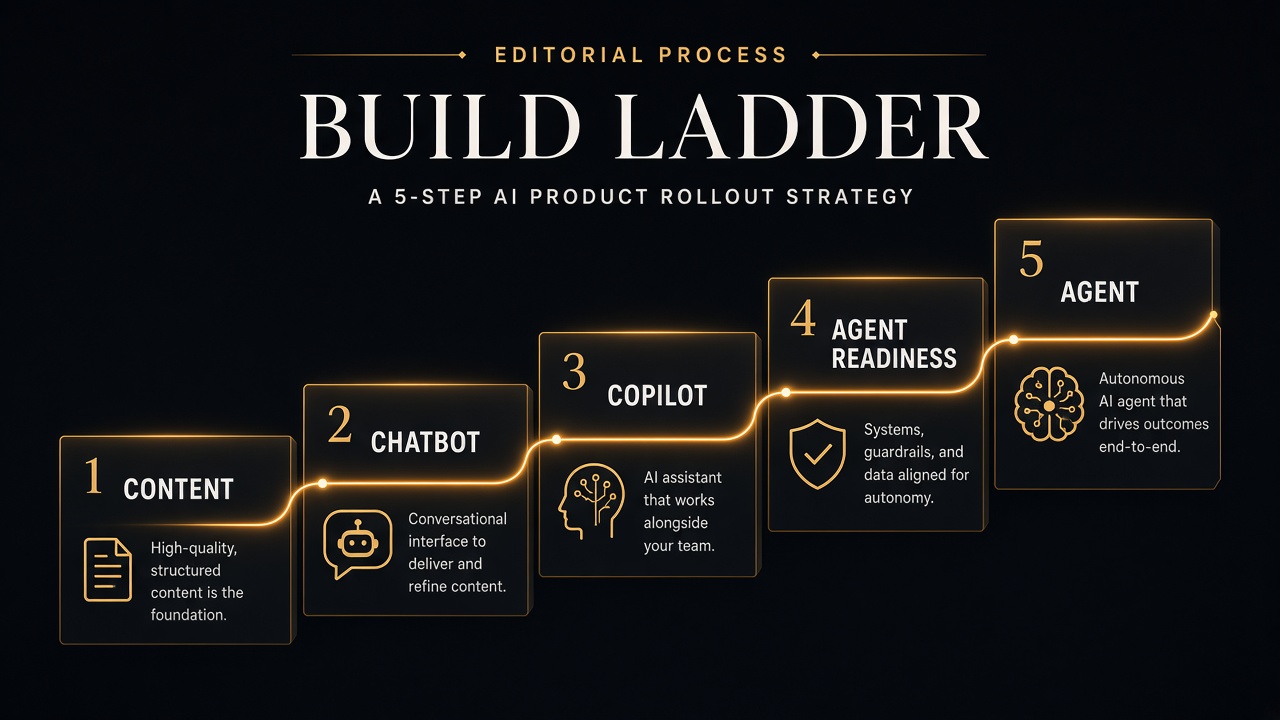
- Content & eligibility layer — clear HTML answers, indexed pages, consistent brand facts. Without this, every AI surface invents your pricing.
- Chatbot layer — retrieve from approved sources; cite or deep-link to the page; escalate early.
- Copilot layer — help humans produce better work faster with mandatory review checkpoints.
- Agent readiness layer — accessibility tree, permissions, logging, optional WebMCP tools for structured actions.
- Agent layer — one high-value outcome first (e.g. “book demo”), not twenty half-finished tools.
Skipping steps 1–2 and jumping to agents is the most common 2025–2026 budget burn we see in audits.
Website & SEO implications (often ignored)
AI product choices change what your website must expose:
- Chatbots need a maintained knowledge base that matches public pages — otherwise Search and chat disagree.
- Copilots need stable admin information architecture; messy CMS fields produce messy drafts.
- Agents need machine-usable capabilities: forms with clear labels, APIs, and optionally WebMCP — plus a well-formed accessibility tree so browser agents can navigate. Details: AI-agent ready checklist.
- Search AI still rewards people-first pages. Chat widgets do not replace citation-worthy content for AI Overviews / AI Mode.
Google’s public guidance remains grounded in helpful content and core Search systems for generative features — see Optimizing for generative AI features (Search Central) and AI features and your website. Treat site AI products as complementary, not as a ranking cheat code.
Trust, permissions, and brand safety (non-negotiables)
- Write scope allowlists — which tools an agent may call; default deny
- Confirmation gates — money, PII, cancellations, emails to customers
- Audit logs — who/what/when for every tool call
- Grounding policy — answers must cite internal docs or refuse
- Human escalation paths — chatbots especially; agents must fail closed
- Consent & privacy — align with your cookie/analytics posture and regional rules
For team copilots, add style guides and “forbidden claims” lists (medical, financial guarantees, competitor slander). For customer agents, publish a short “What our AI can and cannot do” page — it reduces support load and sets expectations.
Cost & KPI model (so finance approves the right thing)
| Surface | Primary KPI | Secondary KPI | Watch-outs |
|---|---|---|---|
| Chatbot | Deflection rate / CSAT | Lead capture quality | False deflection (angry users) |
| Copilot | Time saved per task | Edit distance / rewrite rate | Quality regressions |
| Agent | Task completion rate | Human intervention rate | Unauthorized or partial actions |
Unique detail from delivery: track intervention rate weekly for agents. If humans intervene on >30% of runs after month two, you built a brittle agent — demote autonomy or improve tools/schemas before adding features.
Common mistakes brands make in 2026
- Buying an “AI agent” that is only a chatbot with a new label
- Letting a chatbot invent shipping or refund policy
- Launching a public agent before fixing crawlable service pages
- No evaluation set — shipping vibes instead of regression tests
- One mega-prompt instead of tools + retrieval + permissions
- Ignoring mobile UX of chat overlays (they destroy conversions)
- Skipping accessibility — agents and assistive tech both suffer
90-day plan: from buzzword to shipped stack
Days 1–30 — Clarity
- List top 20 user intents from Search Console, support tickets, and sales calls
- Score each on the Intent–Autonomy Matrix
- Pick one chatbot intent cluster and one internal copilot workflow
- Fix the three public pages those intents depend on (answers in HTML)
Days 31–60 — Ship controlled value
- Launch chatbot with retrieval from approved URLs + handoff
- Launch copilot with mandatory human publish/send
- Instrument KPIs above; kill features that inflate vanity metrics
Days 61–90 — Agent pilot (one outcome)
- Choose one outcome (e.g. book a consult)
- Expose structured tools (API or WebMCP); add confirmation + logs
- Run shadow mode (agent proposes, human executes) for two weeks
- Promote to limited autonomy only if intervention rate trends down
Decision checklist: what should we build?
- ☐ We named the job, not the model vendor
- ☐ Intent clarity scored ≥ 3 for anything autonomous
- ☐ Knowledge sources match public website facts
- ☐ Chatbot has escalation and citations/deep links
- ☐ Copilot has review gates and brand constraints
- ☐ Agent has allowlisted tools, confirmations, and audit logs
- ☐ Website readiness checked (content, a11y, optional WebMCP)
- ☐ KPIs and a 90-day kill/iterate plan exist
Key takeaways
- Chatbots answer and route; copilots assist humans; agents complete outcomes with tools.
- Use the Intent–Autonomy Matrix to stop overbuilding.
- Sequence matters: content → chatbot → copilot → agent readiness → agent.
- Search AI visibility still needs strong pages — site AI does not replace SEO fundamentals.
- Measure intervention rate; high intervention means lower autonomy, not more prompts.
If you want a workshop that maps your intents to the right stack — and a website ready for agents without breaking brand safety — talk to Let Start Design. We design, build, and harden sites for Search, conversions, and emerging agent interfaces. Explore our services, free online tools, and the full blog for more playbooks.
Related reading: WebMCP explained · Add WebMCP (developer guide) · AI-agent readiness · Get cited in AI Overviews · White label partnership.
Sources: Google Search Central — Optimizing for generative AI features; AI features and your website; NIST AI Risk Management Framework (governance lens for higher-autonomy systems).


