

Quick answer: A Shopify order-status bot should verify the customer (email + order number at minimum), look up the order through the official Admin API, map fulfillment/tracking into a plain-language reply, and only auto-send when identity matches and the status is unambiguous. Everything else — cancellations, refunds, address changes, mismatched emails — stays draft-only or escalates to a human.
This is Part 3 of Build Real AI Automations. Part 1 built a lead-qualification bot. Part 2 built a draft-only support triage bot. Here we take one narrow intent — Where is my order? — and show when verified data can graduate from draft to supervised auto-reply.
“Where is my order?” (WISMO) is often 20–40% of ecommerce support volume. It is also one of the few intents safe enough for careful automation — if you treat Shopify as the source of truth and never invent tracking numbers.
What this bot is allowed to do
Allowed (after verification)
- Confirm order received / paid / in fulfillment.
- Share carrier name, tracking number, and tracking URL from Shopify fulfillments.
- Explain estimated delivery windows only when those fields exist on the order or your policy doc.
- Point to the customer account order page.
- Offer a human handoff if the shipment is stuck past your SLA.
Not allowed
- Looking up orders with only a name or phone (too easy to social-engineer).
- Changing shipping address, canceling, refunding, or editing line items.
- Guessing “it should arrive tomorrow” without data.
- Exposing other customers’ orders when email/order mismatch.
- Auto-sending when fulfillment data is missing or contradictory.
Architecture
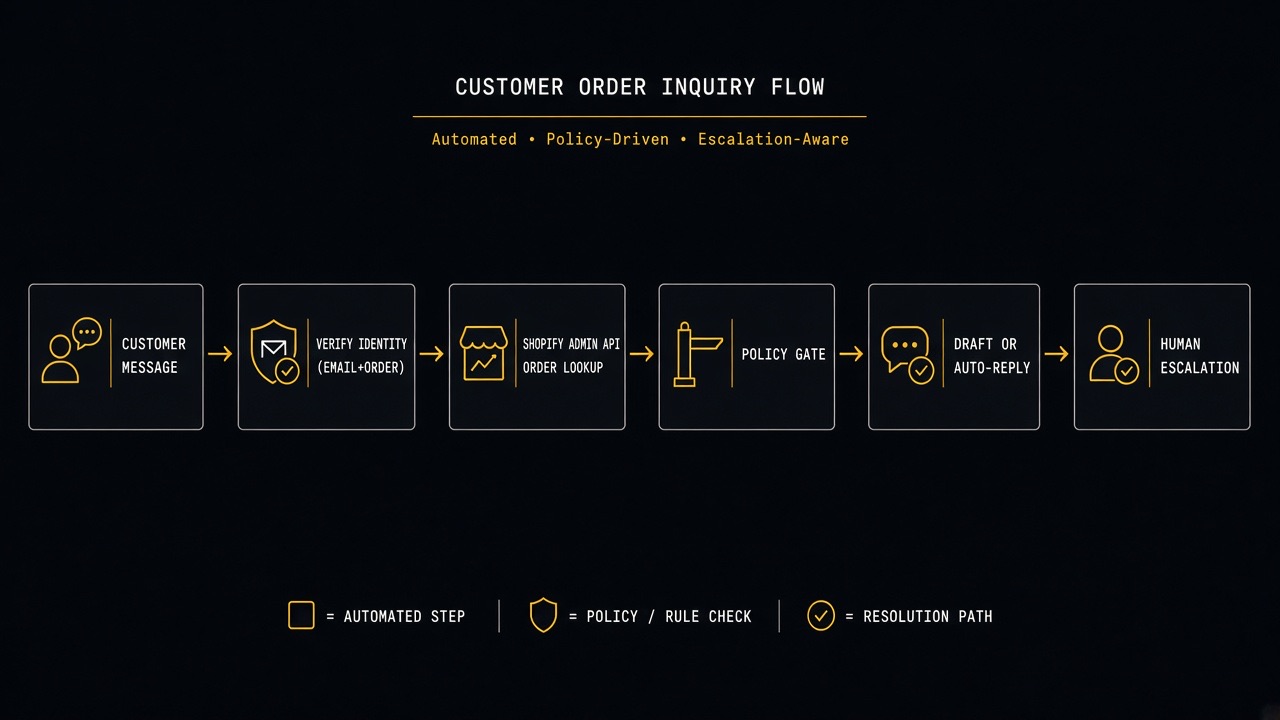
- Channel — helpdesk ticket, chat widget, or WhatsApp (same verify rules everywhere).
- Intent detect — WISMO classifier (rules + optional LLM label).
- Verify — require order number + email that matches
order.email/ customer email. - Lookup — Shopify Admin API (GraphQL preferred).
- Normalize — map financial + fulfillment status to customer language.
- Gate — auto-send vs draft vs escalate.
- Reply — template filled with verified fields only.
- Log — order ID, match method, status snapshot, send mode.
Step 1 — Shopify app & permissions
Create a custom app (or Partner app) with least privilege read scopes. For status lookups you typically need read access to orders and fulfillments — not write access to refunds or store credit.
- Start from Shopify’s app building docs.
- Prefer Admin GraphQL API over REST for new builds.
- Review access scopes and grant only what the bot needs.
- Store the Admin API access token in a secrets manager — never in theme Liquid or frontend JS.
If you previously used REST, Shopify’s Admin REST reference still documents order resources, but GraphQL is the forward path.
Step 2 — Identity verification (non-negotiable)
Before any lookup response goes to the customer, collect:
- Order name/number — e.g.
#10422(normalize by stripping#and spaces). - Email used at checkout — must match the order email (case-insensitive).
Optional stronger checks for high-risk stores:
- Last 4 digits of the phone on the order.
- Magic link / OTP to the order email before revealing tracking.
- Logged-in customer session (Storefront / customer account) — best UX when available.
Mismatch rule: if order exists but email does not match, reply with a generic “We couldn’t verify that order with this email” — never confirm the order exists to a stranger.
Step 3 — Look up the order (GraphQL sketch)
Query by order name, then verify email in your application code. Fields you typically need:
- Order name, createdAt, displayFinancialStatus, displayFulfillmentStatus
- Customer / email
- Fulfillments: status, trackingInfo (company, number, url), estimatedDeliveryAt if present
- CancelledAt / cancel reason if any
- Shipping address city/country only (avoid dumping full street in chat unless necessary)
See Shopify’s order object docs inside the Order GraphQL object and fulfillment tracking fields under fulfillments.
Implementation tips:
- Cache lookups for 60–120 seconds keyed by
orderId + emailHashto survive chatty customers. - Handle API rate limits with backoff (Shopify rate limits).
- Never log full tokens; redact tracking URLs in low-sensitivity logs if required by policy.
Step 4 — Map Shopify statuses to human language
| Shopify signal | Customer-facing meaning | Auto-send? |
|---|---|---|
| Paid + Unfulfilled | Order confirmed; preparing to ship | Yes (verified) |
| Partial fulfillment | Part of your order has shipped; list tracking per package | Yes if tracking present |
| Fulfilled + tracking URL | Shipped — here is tracking | Yes |
| Fulfilled + no tracking | Marked shipped; tracking not available yet | Draft / soft template |
| On hold / payment pending | Waiting on payment or review | Draft (policy wording) |
| Cancelled | Order canceled — explain next steps | Draft / escalate |
| Refunded | Refund recorded — do not invent timing | Escalate or policy draft |
| Email mismatch | Could not verify | Yes (generic deny) |
Keep a store-specific glossary. “Unfulfilled” means nothing to customers — “We’re packing it” does.
Step 5 — Policy gate: when to auto-send
Graduate from Part 2’s draft-only model only when all of these are true:
- Intent = WISMO (not refund/cancel/address change).
- Email + order verified.
- Lookup succeeded.
- Status is in the auto-send allowlist.
- Tracking fields (if claimed) are present from Shopify — not inferred.
- No risk flags (chargeback language, “lawyer,” fraud claims).
Otherwise: create a draft in the helpdesk for human approval (same Approve/Edit/Escalate UX as Part 2).
Reply templates (fill with verified fields only)
Shipped with tracking
“Hi {first_name} — order {order_name} shipped via {carrier}. Track it here: {tracking_url}. If the link shows no movement for 48 hours after the label was created, reply here and we’ll dig in.”
Paid, not yet shipped
“Hi {first_name} — we have order {order_name} and it’s being prepared. Our usual dispatch window is {policy_window}. We’ll email tracking as soon as the carrier scan appears.”
Could not verify
“I couldn’t verify an order with that number and email. Please double-check the email on the receipt, or reply with a screenshot of the order confirmation (order number visible).”
Optional LLM use: rewrite tone only after the template is filled — never let the model invent carrier or ETA fields.
Channel notes: chat, email, WhatsApp
- Helpdesk email/chat: easiest audit trail; store verification state on the ticket.
- Store chat widget: collect order + email in form fields before calling Shopify.
- WhatsApp: use official Cloud API patterns from Part 1; still require verification; be careful with tracking links and opt-out.
Gorgias and similar Shopify-centric helpdesks often already sync order context — still re-verify in your bot logic before auto-send. See Gorgias API if that is your agent workspace.
2-week MVP plan
Days 1–3 — Access + glossary
- Custom app + read scopes.
- Write status glossary and auto-send allowlist.
- Define verification prompts per channel.
Days 4–7 — Lookup service
- GraphQL order fetch + email match.
- Unit tests: match, mismatch, missing tracking, cancelled.
- Red-team: order number without email must not leak data.
Days 8–11 — Bot wiring
- Intent detect → verify → lookup → gate.
- Template renderer.
- Draft path into helpdesk for non-allowlisted cases.
Days 12–14 — Pilot
- Enable auto-send for “Fulfilled + tracking URL” only.
- Sample 25 tickets/day for factual errors.
- Expand allowlist only when error rate stays near zero.
KPIs
| KPI | Why | Target direction |
|---|---|---|
| % WISMO auto-resolved | Deflection | Up carefully |
| Verification success rate | UX friction | Improve copy/flows |
| False auto-sends | Trust | Must stay ~0 |
| Time-to-first-response | CSAT | Down |
| Escalations after auto-reply | Template quality | Down |
| Agent handle time on WISMO | ROI | Down |
Security & compliance checklist
- Least-privilege Shopify scopes; rotate tokens.
- No order data in browser-side code.
- Rate-limit verify attempts per session (stop brute-forcing order numbers).
- Mask street address in chat; full address only when policy requires and identity is strong.
- Align retention of ticket transcripts with your privacy policy.
- For EU shoppers, keep GDPR-aligned processing and vendor DPAs in mind (EU data protection overview).
Common failures
- Auto-send without email match: instant privacy incident — ship mismatch tests first.
- LLM writes ETA: ban free-form dates; only print Shopify/carrier fields.
- REST polling spam: cache + respect rate limits.
- Partial fulfillments ignored: list each package’s tracking.
- Theme app embed “AI chat” with write scopes: over-permissioned apps are a supply-chain risk.
- No draft fallback: when data is weird, humans are cheaper than angry customers.
How this fits the series
- Part 1 — qualify inbound sales leads.
- Part 2 — draft support replies with RAG + approval.
- Part 3 — verified Shopify WISMO with selective auto-send.
Together they show the real progression: automate intake → automate drafts → automate only the intents you can prove.
What Part 4 will cover
Next: Content Ops Bot — Turn One Brief Into Outline, Draft, Internal Links & FAQs — an agency workflow automation for blog/product content without publishing unsupervised pages.
Key takeaways
- WISMO is automatable only after identity verification.
- Shopify Admin API is the source of truth — templates print fields, models do not invent them.
- Auto-send allowlists beat all-or-nothing bots.
- Mismatched email must never confirm an order exists.
- Measure false auto-sends ruthlessly; expand slowly.
Need a verified order-status bot on Shopify (chat, helpdesk, or WhatsApp) with sane scopes and an escalation path? Talk to Let Start Design. We build Shopify storefronts and the support automations that keep WISMO from eating your team’s day.
Related: Part 2 — Support triage bot · Part 1 — Lead-qualification bot · Agents vs chatbots vs copilots · Shopify development
Sources: Shopify Admin GraphQL API; Order object; Access scopes; Rate limits; Build apps on Shopify.


