

Picture an AI assistant trying to book a demo on your site. It scrolls. It mis-clicks a cookie banner. It fills the wrong field in your multi-step form. It hallucinates a "Submit order" button that does not exist. You watch the session recording and wince.
That is what most "AI browser agents" do today: they treat your website like a screenshot puzzle. They guess coordinates, parse messy DOM trees, and pray the layout did not change since yesterday.
WebMCP is the opposite approach. Instead of teaching agents to see your UI, you teach them what your site can do — with named tools, JSON schemas, and browser-mediated permissions. Your page becomes a cooperative participant in the task, not a obstacle course.
This guide explains WebMCP in plain language, shows you how to implement it (imperative JavaScript and declarative HTML forms), and walks through the decisions we make at Let Start Design when clients ask whether their site should support AI agents in 2026.
What WebMCP Actually Is
WebMCP is a proposed web standard (originally from the Web Machine Learning Community Group, with implementations landing in Chrome) that lets websites register structured "tools" an AI agent can discover and invoke — inside a real browser tab.
Think of it as giving your site a typed API surface for agents:
- Discovery — agents call
document.modelContext.getTools()and receive a list of available actions. - Schema — each tool declares inputs as JSON Schema (string, enum, required fields).
- Execution — the browser runs your JavaScript callback or submits your annotated form, with the user able to see what happened.
- Mediation — the browser sits between the agent and your page, which matters for consent, focus indicators, and high-stakes confirmations.
Official docs live on Chrome for Developers. The explainer and proposal are on GitHub (webmachinelearning/webmcp).
Important nuance: WebMCP is experimental. APIs may change. You need a browsing context — there is no headless remote invocation today. But if you build web products that will exist for five years, this is worth understanding now, the same way structured data was worth implementing before rich results became table stakes.
WebMCP vs Server MCP vs "Just Let the Bot Click"
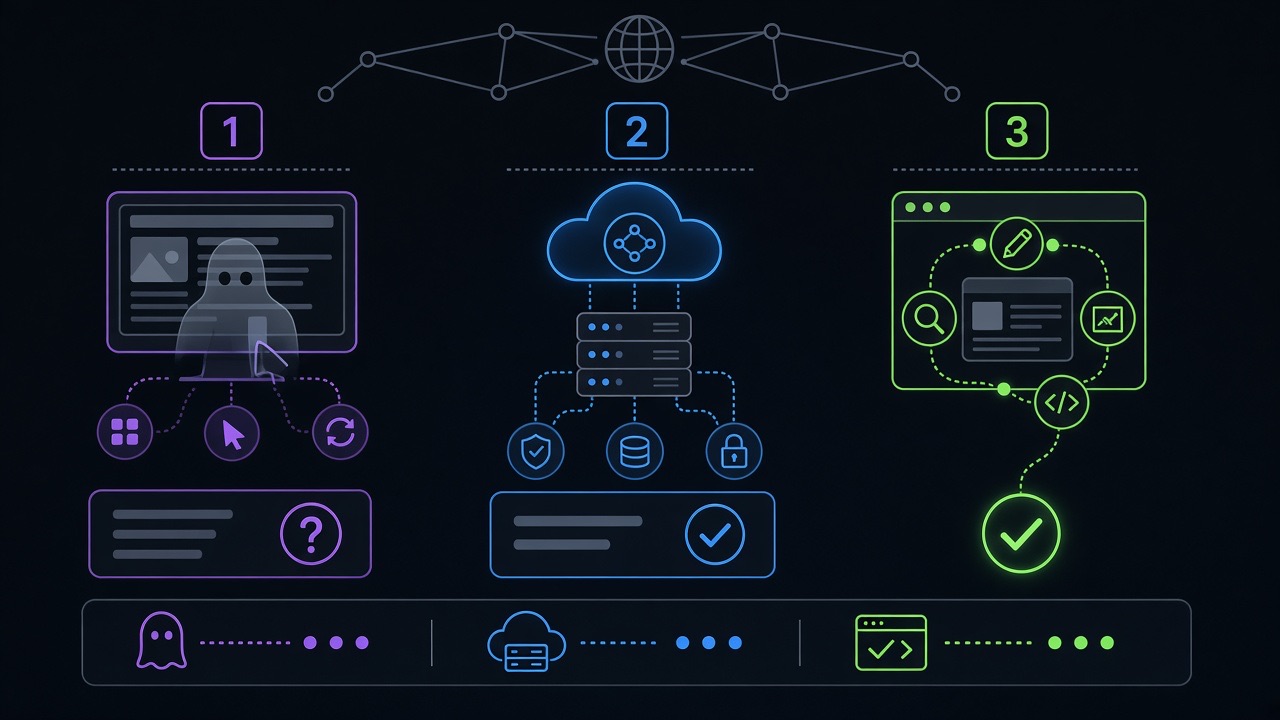
Three patterns get conflated. They solve different problems.
1. UI automation (screen scraping, accessibility tree walking)
The agent navigates like a user. No developer involvement required — which sounds convenient until it breaks on your A/B test, your new checkout step, or a modal z-index war.
Pros: zero integration work.
Cons: fragile, expensive (tokens + retries), bad for accessibility, hostile to site owners who pay for bot traffic.
2. Server-side Model Context Protocol (MCP)
MCP connects an AI client to your backend — databases, CRM, inventory APIs. Claude Desktop and other clients consume MCP servers you host separately.
Pros: powerful, headless, great for internal tools and authenticated APIs.
Cons: second codebase to maintain, auth complexity, agents cannot see your live UI state unless you sync it.
3. WebMCP (in-page tools)
Your existing front-end registers tools that run in the user's browser session. The agent and the human share the same page context — same cart, same filters, same half-filled form.
Pros: one codebase for UI + agent actions, lower latency, privacy-friendly (fewer server round-trips), user-visible actions.
Cons: requires a visible tab, developer must implement tools deliberately, cross-browser support still maturing.
In practice you will use all three in different layers. WebMCP does not replace MCP for your warehouse API. It replaces the fantasy that a vision model can reliably operate your React checkout without help.
How WebMCP Works Under the Hood
Two roles matter:
- Model context provider — your website, loaded in a top-level browsing context (a tab).
- Agent — the AI application (built-in browser assistant, extension, or embedded chat) that discovers and calls tools.
Your page registers tools via document.modelContext.registerTool() or by annotating HTML forms. The agent calls getTools(), picks one, and invokes executeTool(tool, arguments). Your callback runs — updates state, DOM, maybe calls fetch — and returns structured text the model can reason about.
Sequential execution on the main thread is a feature, not a bug: tool calls do not race each other, and your UI stays coherent. Heavy work can delegate to Web Workers; the agent waits for the promise.
For purchases, account deletion, or anything irreversible, use tool annotations like consequentialHint: true so the browser can force explicit user confirmation before execution.
Ready to implement? Follow our complete developer guide to adding WebMCP for step-by-step code, Next.js wiring, and production testing.
Imperative API: Register Tools in JavaScript
Use the imperative API when your app logic lives in JavaScript — SPAs, interactive dashboards, configurators. You wrap existing functions as tools.
Minimal example — filter a product list:
await document.modelContext.registerTool({
  name: 'filter_products',
  description: 'Filter the catalog by category and max price. Updates the visible grid.',
  inputSchema: {
    type: 'object',
    properties: {
      category: {
        type: 'string',
        enum: ['hosting', 'themes', 'services'],
        description: 'Product category slug',
      },
      maxPrice: {
        type: 'number',
        description: 'Maximum price in USD',
      },
    },
    required: ['category'],
  },
  annotations: {
    readOnlyHint: false,
  },
  execute: async ({ category, maxPrice }, { signal }) => {
    const items = await loadCatalog({ category, maxPrice, signal });
    renderGrid(items);
    return `Showing ${items.length} products in "${category}"${
      maxPrice ? ` under $${maxPrice}` : ''
    }.`;
  },
});
Notice what makes this agent-friendly:
- The
nameis stable and machine-readable (filter_products, not "Filter stuff"). - The
descriptiontells the model when to use the tool, not just what it is. - Enums beat free-text when options are finite — fewer hallucinated category names.
- The return string confirms outcome in natural language the model can quote back to the user.
signalpropagates cancellation if the user aborts mid-task.
For read-only lookups (order status, availability checks), set readOnlyHint: true. For user-generated content in responses, set untrustedContentHint: true so clients sanitize before feeding back into the model — this mitigates indirect prompt injection from reviews or comments.
Chrome ships TypeScript types via the webmcp-types npm package. React teams can use the experimental usewebmcp hook to register tools on mount and clean up on unmount — which matters when tools should appear only on certain routes.

Declarative API: Turn HTML Forms Into Tools
Not everything needs custom JavaScript. If the job-to-be-done is already a form — contact request, support ticket, search, newsletter signup — annotate the <form> and let the browser build the schema.
<form
  toolname="create_support_request"
  tooldescription="Submit a customer support request. Routes to the correct team based on issue type."
  action="/support/submit"
>
  <label for="email">Email</label>
  <input type="email" name="email" required
    toolparamdescription="Customer email for follow-up." />

  <label for="issueType">Issue type</label>
  <select name="issueType" required
    toolparamdescription="Determines which support queue receives the ticket.">
    <option value="billing">Billing question</option>
    <option value="technical">Technical problem</option>
    <option value="sales">Sales inquiry</option>
  </select>

  <label for="message">Message</label>
  <textarea name="message" required
    toolparamdescription="Detailed description of the issue."></textarea>

  <button type="submit">Send request</button>
</form>
When an agent invokes this tool, the browser focuses the form, pre-fills fields, and leaves submission visible to the user. That transparency is the point — no shadow transactions.
Two patterns worth knowing:
toolautosubmit— auto-submit after the agent fills fields (use carefully; pair with validation).e.agentInvokedon submit — branch logic when a human vs agent triggered the form.e.respondWith(promise)— return structured results to the model afterpreventDefault(), without a full page navigation.
CSS pseudo-classes :tool-form-active and :tool-submit-active highlight which form the agent is operating — customize them so users are never confused about who is driving.
A Real Workflow: Ecommerce "Find and Add to Cart"
Suppose you run a WooCommerce or headless store. Instead of letting an agent click product thumbnails, expose three tools:
search_products— query + filters, returns SKU list (read-only).get_product_details— SKU in, structured specs + price out (read-only).add_to_cart— SKU + quantity, updates cart UI (write, consequential).
The agent chains them logically. Your analytics still fire. Your cart drawer still opens. Support tickets drop because the agent stopped "adding" the wrong variant.
Our web development team maps these tools to existing cart functions — we are not rewriting commerce logic, we are exposing it. Same pattern works on WordPress, Next.js, or Shopify Hydrogen with different state layers.
Testing Before You Ship
Do not guess whether agents will understand your schemas. Chrome provides the Model Context Tool Inspector extension — load your page, inspect registered tools, manually call executeTool, and read error output.
Test matrix we use internally:
- Happy path with minimal required fields only
- Invalid enum value (agent typo simulation)
- User cancels mid-execution (
AbortSignalpropagation) - Tool unregistered after SPA route change — does the agent get an updated list via
toolchangeevents? - Cross-origin iframe with
allow="tools"policy if tools live in embedded widgets
Log return strings. If they are vague ("Success"), the model will be vague with your customer. Return specifics: "Added 2× SKU-8841 to cart. Subtotal $118."
Security and Trust: What Can Go Wrong
WebMCP is safer than blind automation, but it is not magic.
- Over-powered tools — do not expose
delete_all_orderswith a cheerful description. Split read and write tools; mark consequential actions explicitly. - Prompt injection via tool output — if a tool returns user reviews or scraped HTML, set
untrustedContentHint: true. - Cross-origin exposure — tools are same-origin by default. Sharing with partners requires
exposedToplus iframeallow="tools"— treat it like CORS, not a free-for-all. - Auth gaps — WebMCP runs in the user's session. If they are logged in, the agent operates as them. Gate sensitive tools behind re-auth or step-up confirmation via
agent.requestUserInteraction().
The browser mediation model is the strategic bet: users can see forms light up, confirm purchases, and cancel. That is harder to achieve when agents operate headless against your REST API with a stolen token.
When You Should (and Should Not) Implement WebMCP
Good fit:
- SaaS dashboards with repeatable actions (filter, export, configure)
- Support portals and lead forms agents should fill accurately
- Marketplaces and catalogs with structured inventory
- Booking flows where steps are well-defined
- Sites investing in structured data already — you already think in schemas
Poor fit (for now):
- Marketing sites with zero interactive functionality
- Flows that require heavy server-side authorization you cannot mirror client-side
- Products that must support agents in fully headless environments today — use MCP server-side instead
- Teams with no capacity to maintain tool definitions when UI changes
If your site is mostly content, focus on crawlability, Core Web Vitals, and FAQ schema via our FAQ Schema Generator. WebMCP is for applications, not brochure pages.
Implementation Checklist
- ☐ List the top 5 tasks users (and agents) try to complete on your site
- ☐ Decide imperative vs declarative per task
- ☐ Write JSON Schema with enums, descriptions, and required fields
- ☐ Wire execute callbacks to existing app functions — avoid duplicate business logic
- ☐ Add annotations for read-only vs consequential tools
- ☐ Update UI on every tool execution (humans and agents must see the same state)
- ☐ Listen for
toolchangeif tools vary by route or SPA state - ☐ Test with Model Context Tool Inspector + realistic agent prompts
- ☐ Document tools internally so marketing and support know what agents can do
- ☐ Monitor: agent-invoked form submissions separately in analytics
What About SEO and Discoverability?
WebMCP does not replace SEO. Google still ranks helpful content, fast pages, and clear information architecture. But the proposal authors note an open question: how will agents discover which sites expose which tools? Search engines, registries, or site manifests may play a role — similar to how sitemaps and schema became discovery layers for crawlers.
Our bet: sites that already publish clean structured data, maintain updated sitemaps, and ship reliable interactive UX will adapt faster when agent discovery matures. Getting WebMCP right is a product moat, not a meta-tag trick.
Where WebMCP Is Headed
Chrome is running an origin trial. React and Angular integrations are experimental. The API surface is still moving — navigator.modelContext vs document.modelContext naming has evolved in docs, and JSON string arguments are being deprecated in favor of objects.
That volatility is exactly why early adopters who document their tools well will lead. When the standard stabilizes, you will not be scrambling — you will be refining.
Follow the WebMCP API proposal, join Chrome's early preview program if you are shipping production experiments, and file bugs when reality does not match the spec.
Need Help Making Your Site Agent-Ready?
WebMCP sits at the intersection of front-end engineering, product design, and security — which is where most teams get stuck. You know you should not let bots scrape your checkout, but you also cannot ignore that customers will expect AI assistants to complete tasks on your site.
Let Start Design builds and redesigns web applications with this future in mind: structured tools, schema-driven forms, performance budgets, and analytics that separate human clicks from agent-assisted flows. See our portfolio, read client feedback, or start a conversation about an agent-ready roadmap for your platform.
Web development services · More AI Agents articles · Free SEO & dev tools


