

Quick answer:
An animated pricing toggle lets visitors switch Monthly ↔ Yearly with a sliding pill, morphing prices, a “Save %” badge, and yearly billed totals — all in pure HTML, CSS, and a small JavaScript snippet. Copy the code below or open the live demo first.
Live demo: Animated Pricing Toggle (Monthly/Yearly)
What you will build
This free Get Code pack includes:
- A pill-style Monthly / Yearly switch with a sliding amber thumb
- Price numbers that animate when billing changes
- A teal Save 20% badge that appears on yearly
- “Billed $X / year” helper text under each plan
- Three responsive pricing cards (Starter, Growth, Studio)
- Accessible
role="switch"toggle with keyboard focus styles
No React. No jQuery. Drop it into WordPress, Elementor HTML, Shopify, or any static page.
Live preview screenshots
Monthly billing
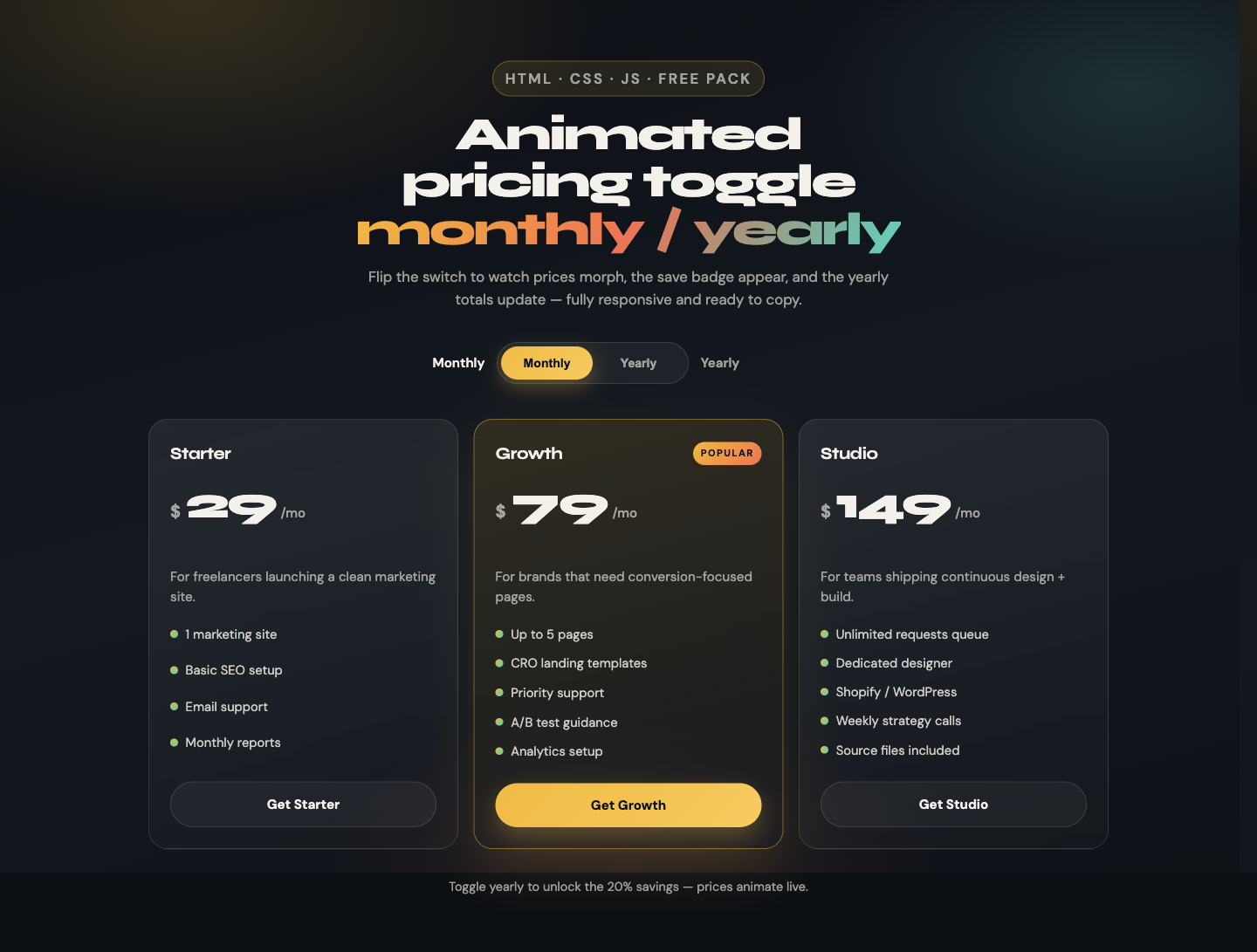
Monthly is the default. Growth stays featured with the amber border and primary CTA.
Yearly billing + Save badge
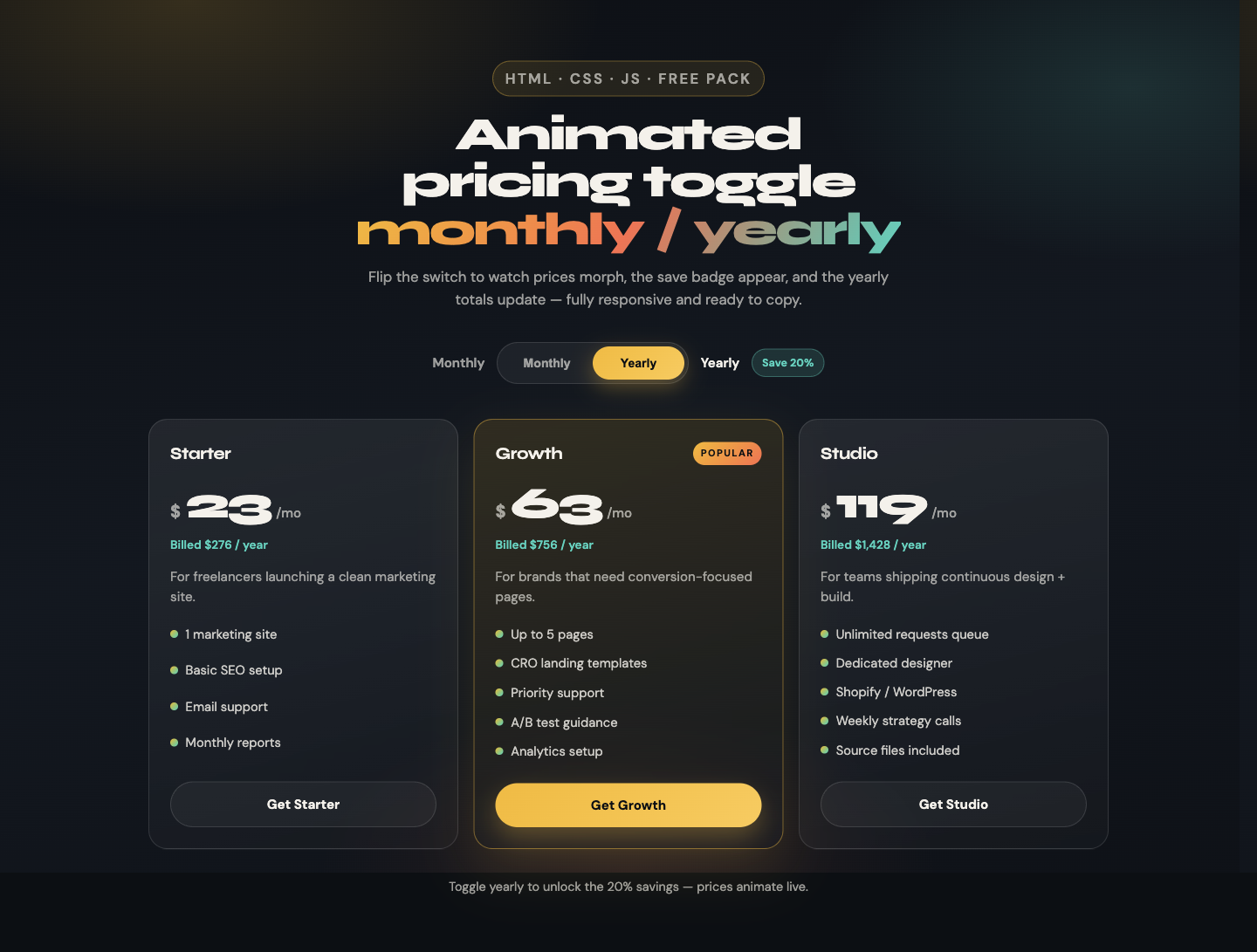
Flip the switch: prices drop, the save badge fades in, and yearly billed totals appear under each price.
Mobile layout

On small screens cards stack to one column and the Popular plan rises to the top for better conversion focus.
How to use this code
- Create
index.html(or paste into an HTML widget). - Add the CSS in a
<style>tag orstyles.css. - Add the JavaScript before
</body>. - Set each card’s prices with
data-monthlyanddata-yearly. - Open the page, click the toggle, confirm prices and the save badge update.
- Swap plan names, features, and CTAs for your offer.
Tip:
Keep yearly prices as the per-month equivalent (example: $79/mo → $63/mo billed annually). The script multiplies by 12 for the “Billed $X / year” line.
HTML code
<div class="billing">
  <span class="billing-label is-active" id="labelMonthly">Monthly</span>

  <button
    class="toggle"
    id="billingToggle"
    type="button"
    role="switch"
    aria-checked="false"
    data-billing="monthly"
    aria-label="Toggle yearly billing"
  >
    <span class="toggle-thumb" aria-hidden="true"></span>
    <span class="toggle-option" data-value="monthly">Monthly</span>
    <span class="toggle-option" data-value="yearly">Yearly</span>
  </button>

  <span class="billing-label" id="labelYearly">Yearly</span>
  <span class="save-badge" id="saveBadge" aria-live="polite">Save 20%</span>
</div>

<div class="cards">
  <article class="card" data-monthly="29" data-yearly="23">
    <div class="card-top"><h2 class="plan-name">Starter</h2></div>
    <div class="price-row">
      <span class="currency">$</span>
      <span class="price" data-price>29</span>
      <span class="period">/mo</span>
    </div>
    <p class="billed" data-billed>Billed $276 / year</p>
    <p class="desc">For freelancers launching a clean marketing site.</p>
    <ul class="features">
      <li>1 marketing site</li>
      <li>Basic SEO setup</li>
      <li>Email support</li>
    </ul>
    <a class="cta" href="#get-started">Get Starter</a>
  </article>

  <article class="card is-featured" data-monthly="79" data-yearly="63">
    <div class="card-top">
      <h2 class="plan-name">Growth</h2>
      <span class="plan-tag">Popular</span>
    </div>
    <div class="price-row">
      <span class="currency">$</span>
      <span class="price" data-price>79</span>
      <span class="period">/mo</span>
    </div>
    <p class="billed" data-billed>Billed $756 / year</p>
    <p class="desc">For brands that need conversion-focused pages.</p>
    <ul class="features">
      <li>Up to 5 pages</li>
      <li>CRO landing templates</li>
      <li>Priority support</li>
    </ul>
    <a class="cta is-primary" href="#get-started">Get Growth</a>
  </article>

  <article class="card" data-monthly="149" data-yearly="119">
    <div class="card-top"><h2 class="plan-name">Studio</h2></div>
    <div class="price-row">
      <span class="currency">$</span>
      <span class="price" data-price>149</span>
      <span class="period">/mo</span>
    </div>
    <p class="billed" data-billed>Billed $1,428 / year</p>
    <p class="desc">For teams shipping continuous design + build.</p>
    <ul class="features">
      <li>Unlimited requests queue</li>
      <li>Dedicated designer</li>
      <li>Shopify / WordPress</li>
    </ul>
    <a class="cta" href="#get-started">Get Studio</a>
  </article>
</div>
CSS code
:root {
  --ink: #0c0f14;
  --border: rgba(255, 255, 255, 0.12);
  --text: #f4f1ea;
  --muted: rgba(244, 241, 234, 0.62);
  --amber: #f9b818;
  --coral: #ff6b4a;
  --teal: #2dd4bf;
  --ease: cubic-bezier(0.22, 1, 0.36, 1);
}

.billing {
  display: flex;
  justify-content: center;
  align-items: center;
  gap: 0.85rem;
  flex-wrap: wrap;
  margin-bottom: 2.5rem;
}

.billing-label {
  font-weight: 600;
  color: var(--muted);
}
.billing-label.is-active { color: var(--text); }

.toggle {
  position: relative;
  display: inline-grid;
  grid-template-columns: 1fr 1fr;
  width: 220px;
  height: 48px;
  padding: 4px;
  border-radius: 999px;
  border: 1px solid var(--border);
  background: rgba(255, 255, 255, 0.05);
  cursor: pointer;
}

.toggle-thumb {
  position: absolute;
  top: 4px;
  left: 4px;
  width: calc(50% - 4px);
  height: calc(100% - 8px);
  border-radius: 999px;
  background: linear-gradient(135deg, var(--amber), #ffc94a);
  box-shadow: 0 8px 24px rgba(249, 184, 24, 0.35);
  transition: transform 0.4s var(--ease);
}

.toggle[data-billing="yearly"] .toggle-thumb {
  transform: translateX(100%);
}

.toggle-option {
  position: relative;
  z-index: 1;
  display: grid;
  place-items: center;
  font-size: 0.88rem;
  font-weight: 700;
  color: var(--muted);
}

.toggle[data-billing="monthly"] .toggle-option[data-value="monthly"],
.toggle[data-billing="yearly"] .toggle-option[data-value="yearly"] {
  color: #0c0f14;
}

.save-badge {
  padding: 0.35rem 0.7rem;
  border-radius: 999px;
  background: rgba(45, 212, 191, 0.14);
  border: 1px solid rgba(45, 212, 191, 0.35);
  color: var(--teal);
  font-size: 0.78rem;
  font-weight: 700;
  opacity: 0;
  transform: translateY(4px) scale(0.96);
  transition: 0.3s var(--ease);
}
.save-badge.is-visible {
  opacity: 1;
  transform: none;
}

.cards {
  display: grid;
  grid-template-columns: repeat(3, 1fr);
  gap: 1.1rem;
}

.card {
  display: flex;
  flex-direction: column;
  padding: 1.5rem;
  border-radius: 1.35rem;
  border: 1px solid var(--border);
  background: linear-gradient(165deg, rgba(255,255,255,0.07), rgba(255,255,255,0.02));
}

.card.is-featured {
  border-color: rgba(249, 184, 24, 0.45);
  box-shadow: 0 24px 60px rgba(249, 184, 24, 0.12);
}

.price {
  font-size: clamp(2.4rem, 4vw, 3.1rem);
  font-weight: 800;
  transition: transform 0.25s var(--ease), opacity 0.25s ease;
}
.price.is-updating {
  opacity: 0;
  transform: translateY(8px);
}

.billed {
  min-height: 1.25rem;
  color: var(--teal);
  font-weight: 600;
  opacity: 0;
}
.billed.is-visible { opacity: 1; }

.cta {
  margin-top: auto;
  display: inline-flex;
  justify-content: center;
  padding: 0.85rem 1rem;
  border-radius: 999px;
  border: 1px solid var(--border);
  text-decoration: none;
  font-weight: 700;
  color: var(--text);
}
.cta.is-primary {
  color: #0c0f14;
  border: none;
  background: linear-gradient(135deg, var(--amber), #ffc94a);
}

@media (max-width: 900px) {
  .cards {
    grid-template-columns: 1fr;
    max-width: 420px;
    margin-inline: auto;
  }
  .card.is-featured { order: -1; }
}
JavaScript code
(function () {
  const toggle = document.getElementById("billingToggle");
  const saveBadge = document.getElementById("saveBadge");
  const labelMonthly = document.getElementById("labelMonthly");
  const labelYearly = document.getElementById("labelYearly");
  const cards = [...document.querySelectorAll(".card")];

  function animatePrice(el, nextValue) {
    el.classList.add("is-updating");
    window.setTimeout(() => {
      el.textContent = String(nextValue);
      el.classList.remove("is-updating");
    }, 160);
  }

  function setBilling(mode) {
    const yearly = mode === "yearly";
    toggle.dataset.billing = mode;
    toggle.setAttribute("aria-checked", yearly ? "true" : "false");
    saveBadge.classList.toggle("is-visible", yearly);
    labelMonthly.classList.toggle("is-active", !yearly);
    labelYearly.classList.toggle("is-active", yearly);

    cards.forEach((card) => {
      const monthly = Number(card.dataset.monthly);
      const yearlyPrice = Number(card.dataset.yearly);
      const priceEl = card.querySelector("[data-price]");
      const billedEl = card.querySelector("[data-billed]");
      const next = yearly ? yearlyPrice : monthly;
      animatePrice(priceEl, next);
      billedEl.classList.toggle("is-visible", yearly);
      if (yearly) {
        billedEl.textContent =
          "Billed $" + (yearlyPrice * 12).toLocaleString("en-US") + " / year";
      }
    });
  }

  toggle.addEventListener("click", () => {
    setBilling(toggle.dataset.billing === "monthly" ? "yearly" : "monthly");
  });

  setBilling("monthly");
})();
Full demo file
Want everything in one file (fonts, layout, cards, toggle, script)?
Open the complete animated pricing toggle demo
Right-click → Save As, or view source and copy.
Customize for your brand
- Change
--amber,--coral, and--tealin:root - Edit
data-monthly/data-yearlyon each card - Update the save badge text (
Save 20%→ your real discount) - Add or remove
.featureslist items - Mark another plan with
.is-featured+.plan-tag
Accessibility notes
- Toggle uses
role="switch"andaria-checked - Save badge uses
aria-live="polite"so screen readers hear the discount - Focus ring appears on keyboard focus (
:focus-visible) - Prices remain readable without the animation if JS is delayed
Common mistakes
- Setting yearly
data-yearlyas the full annual total instead of the monthly equivalent - Forgetting
position: relativeon.toggle(thumb won’t slide correctly) - Nesting cards inside an overflow-hidden parent that clips hover lift
- Hard-coding prices in HTML without updating
data-*attributes the script reads
FAQs
Can I use this pricing toggle commercially?
Yes. Free for personal and commercial projects.
Does it work in WordPress / Elementor?
Yes. Paste the HTML into an HTML widget and enqueue (or inline) the CSS and JS.
How do I change the discount percent?
Update the badge text and your data-yearly values so the math matches the promise.
Will the animation hurt Core Web Vitals?
No meaningful impact. The script is tiny and only toggles classes plus text updates.
Next free packs
See more copy-paste UI in the Get Code library, including the sticky glass navbar with scroll progress. Need a custom pricing section for your brand? Book a consultation.


